

For most families, the best approach is a privacy-first hybrid: a local, shared inventory for belongings plus selective live trackers only for people or vehicles that truly need real-time location. This setup balances privacy, usefulness, and cost better than an all-cloud or all-manual system. Pick one item, a set of car keys, a bag, a bike, and either catalog it tonight or turn on one tracker with clear sharing rules before you do anything else.
TL;DR:
- Family asset tracking should focus on privacy and purpose, using local inventory and selective live trackers based on the item’s needs and context.
- GPS trackers are ideal for transit and outdoor location, BLE tags suit indoor or everyday carry items, while manual cataloging provides maximum privacy.
- Always review privacy settings, restrict data sharing, and implement a household privacy policy that is revisited regularly to maintain trust and control.
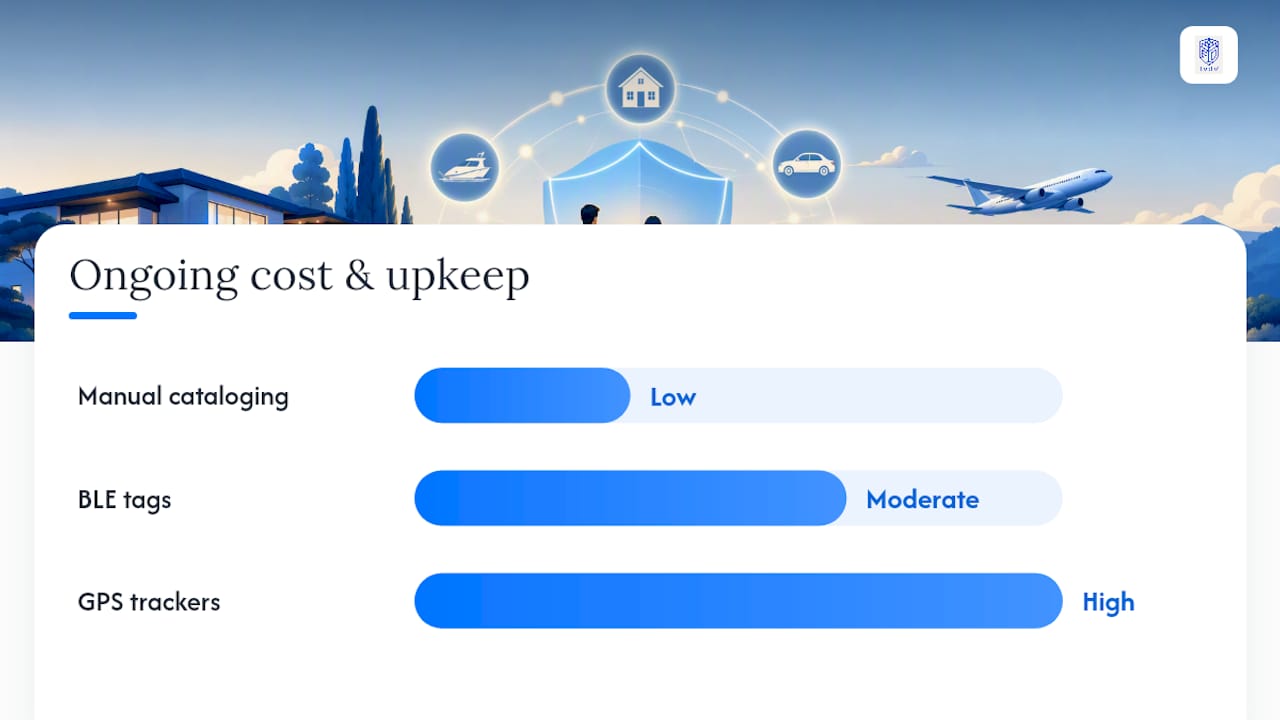
- Recurring costs are highest for GPS devices with data plans, while BLE tags have minimal ongoing costs, and manual tracking mainly involves time investment.
- Family household tracking and broader asset management should remain separate, with secure, role-based access and summarized data sharing for safety and privacy.
Table of Contents
- What Are the Best Options for Asset Tracking for Families?
- How Do You Choose the Right Tracking Approach?
- What Privacy Settings Should Families Change First?
- How Do You Set Up and Maintain a Family Tracking System?
- BLE vs GPS vs RFID: Which Tracking Technology Fits What?
- What Does a Family Tracking System Actually Cost?
- How Does This Fit With Broader Family Asset Management?
- A Note on Consent and Starting Small
- Where a Family Office Platform Fits Alongside Household Tracking
- Sources
- FAQ
What Are the Best Options for Asset Tracking for Families?
Families researching asset tracking for families usually land on four realistic paths, and none of them requires becoming a surveillance household. Each fits a different mix of who or what you're tracking and how much precision you actually need.
- Home inventory apps. These catalog belongings with photos, purchase dates, and ownership notes, stored either on the device or synced to an encrypted cloud account. Great for jewelry, electronics, and anything you'd need to prove ownership of after a theft or fire. Weak point: they don't track location once an item leaves your home.
- BLE tags. Small Bluetooth trackers that ping nearby phones in a crowdsourced network. Good for keys, wallets, and luggage; battery life often stretches close to a year. They lose usefulness outdoors, away from other network devices, and their "crowdsourced" nature means your item's last-seen ping technically touches a stranger's phone.
- GPS tags and trackers. Built for real-time tracking of people in transit or vehicles, since they don't depend on nearby devices to relay a location. Live View GPS notes several practical family uses for GPS tracking, from teen drivers to family road trips, but the trade-off is a data plan or subscription and daily charging.
- Manual cataloging. A spreadsheet, notebook, or offline-first app where you log items by hand, no telemetry, no cloud account, nothing to hack. Slower to maintain, but the most private option by a wide margin, and community discussions increasingly favor this route for privacy-focused, device-only asset tracking.
Match the tool to the scenario. A child who wanders at a theme park needs a GPS, not a BLE tag. A jewelry box needs a home inventory app with photos, not a live tracker. A car needs GPS. A backpack needs BLE. None of these needs an always-on cloud account broadcasting to five family members by default.
How Do You Choose the Right Tracking Approach?
The right choice comes down to six criteria, and running through them takes less time than reading a product page.
- Who or what are you tracking? A toddler, a teenager with a car, an aging parent, a pet, or a physical object each have different urgency levels and different tolerance for constant monitoring.
- How much precision do you actually need? "Somewhere in the house" is fine for keys. "Exact street address right now" matters for a person in transit.
- Is there real consent? Tracking a spouse or teenager without a clear conversation first erodes trust faster than any missing item ever would.
- How much battery maintenance will you tolerate? GPS units often need daily or every-few-days charging; BLE tags can run for months.
- What sharing model does the tool use? Some apps default to sharing a person's location with every connected family member, all the time, with no granular controls.
- What's your budget, one-time and recurring? Hardware is a single purchase; GPS almost always carries an ongoing subscription or data cost.
Walk through this short checklist before buying anything:
- Do I need real-time outdoor location, or just "last known spot"?
- Does the person being tracked understand and agree to it?
- Can I limit who sees this data, and for how long it's kept?
- Am I willing to recharge or replace a battery on a set schedule?
- Does the total first-year cost, hardware plus subscription, fit what I'd actually spend on this problem?
Watch for red flags before you commit to any app or device: broad always-on location sharing turned on by default, unclear data retention windows, vague encryption claims, or a privacy policy that doesn't say plainly whether location history is stored on the device or on a company server.
Pro Tip: Test any new tracker on yourself for a week before rolling it out to the rest of the family. You'll notice battery quirks, false alerts, and sharing defaults faster than any review will tell you.
What Privacy Settings Should Families Change First?
Local-only storage keeps data on the device and nowhere else, which is the strongest privacy posture available but means no backup if the phone is lost. Encrypted cloud sync trades a small amount of privacy for redundancy, worth it for anything you'd be devastated to lose, like a full home inventory with receipts and serial numbers.
Before you trust any tracking app with your family's data, check these settings directly, don't assume the defaults are safe:
- Sharing granularity. Can you share one item's location with one person, or is it all-or-nothing?
- Export controls. Can you pull your own data out in a usable format if you switch apps later?
- Telemetry toggles. Does the app phone home with usage data beyond what's needed to function?
- Retention windows. How long does the company keep location history after you delete it on your end?
One practical habit worth building early: avoid sharing raw map links casually. A quick pin dropped in a group chat looks harmless, but shared map links can carry metadata that reveals more than the single location you meant to send.
Write down a one-page household privacy policy: who can see whose location, when tracking turns off (say, once a teenager gets home safely), and who has admin access to add or remove tracked people. A short written policy like this reduces the awkward mid-argument negotiations that come up later, and makes the system feel like a shared agreement instead of quiet surveillance.
Pro Tip: Review your household privacy policy every six months. Kids grow up, trust changes, and a tracking setup that made sense for a nine-year-old is usually wrong for a fifteen-year-old.
How Do You Set Up and Maintain a Family Tracking System?
Getting a system running takes one deliberate weekend, not a month of tinkering. Follow this order:
- Build your baseline inventory first. Walk room by room and log valuables, electronics, and anything with a serial number. Photograph each item and store proof-of-ownership documents like receipts or appraisals alongside the entry. Jewelry inventory guidance is a useful model for how detailed this baseline should get.
- Adopt a naming convention. "Dad's laptop" beats "Laptop2" when three people are searching the same list six months from now.
- Set permissions deliberately. Decide who can view, who can edit, and who can only be notified, rather than accepting the app's default of "everyone sees everything."
- Configure emergency contacts and access. Make sure at least one trusted adult outside the household can access critical records if something happens to the primary account holder.
- Run a weekly five-minute check. Confirm trackers still have charge and the inventory list matches what's actually in the house. The same lightweight cadence that works for tracking charitable giving applies here.
- Run a monthly full reconciliation. Walk through the list again, mark anything sold, lost, or replaced, and update ownership documents.
- Write a one-paragraph emergency protocol. Who calls whom, in what order, if a person or high-value item goes missing, and what app or number they check first.
Keep the emergency step simple enough that a stressed twelve-year-old could follow it. Complicated protocols get skipped exactly when you need them most.
BLE vs GPS vs RFID: Which Tracking Technology Fits What?
Not every tracking job calls for the same technology, and buying GPS for something BLE would handle better is the most common overspend families make. TEKTELIC's technology breakdown lays out the trade-offs clearly: BLE, GPS, LoRa, and RFID each solve a different problem, and none of them is universally best.
- BLE has strong battery life, often lasting months on a single charge, and works well indoors or in dense urban areas where other phones create a crowdsourced network. It struggles in rural areas or anywhere network density is low.
- GPS gives real-time outdoor location regardless of who else is nearby, which makes it the right call for vehicles and people in transit. The cost is a data plan or subscription and daily or near-daily charging.
- RFID and NFC work for close-range, low-cost indoor tracking, tap a tag against a reader to log an item's location or confirm it's still in the house. No battery in many cases, but no live tracking either.
- Manual cataloging costs nothing beyond your time and gives you full control over what's recorded and where it lives.
As a rule of thumb: use GPS for kids in transit, teen drivers, and vehicles; BLE for bags, keys, and anything that stays mostly indoors or in familiar areas; RFID or NFC for high-turnover inventory like tools or equipment; and manual cataloging for valuables you rarely move but need documented for insurance or estate purposes.
What Does a Family Tracking System Actually Cost?
Budget matters as much as technology, and the recurring costs usually surprise people more than the upfront ones.
- BLE tags typically run a modest one-time cost per tag, with no subscription, though replacement batteries or full tag swaps come up every year or two.
- GPS trackers carry a device cost plus an ongoing monthly subscription for cellular data, the single biggest recurring line item in most family tracking budgets.
- Manual and inventory apps cost little to nothing beyond your time, or a small one-time app purchase for premium photo storage and export features.
A sustainable maintenance rhythm looks like: monthly battery checks on any GPS or BLE devices, quarterly software updates, and one full annual reconciliation where you walk through the entire inventory and cut anything that's obsolete or already sold. Landlords and property managers use a similar cadence for record-keeping upkeep, and the same discipline works for household assets.
The cheapest sustainable strategy for most families: manual cataloging for valuables, BLE for everyday-carry items, and GPS reserved strictly for vehicles or people who travel independently, since GPS trackers introduce the most ongoing cost and battery upkeep of any option on this list.
How Does This Fit With Broader Family Asset Management?
Household tracking and family asset management operate at different altitudes, and conflating them causes most of the friction families run into. Your kid's location or your luggage tag doesn't belong in the same system as ownership records, valuations, and estate documents, but the two should still talk to each other.
- Sync summaries, not raw telemetry. A consolidated platform should hold ownership records, valuations, and document copies, never a live feed of where your teenager's phone was at 3:14 p.m. yesterday.
- Use role-based access. The person managing family finances doesn't need to see location history, and the person tracking a bike doesn't need access to investment statements.
- Encrypt anything centralized. Consolidated reporting only works if the underlying documents are secure, a principle UBS's family office guidance and UBP's family office services both treat as foundational to managing complex family holdings.
For families juggling more than a home inventory, crypto holdings, real estate, or multi-currency accounts often need their own reconciliation logic. Guides on crypto custody tracking, expense categorization, and FX exposure across accounts go deeper on those specific problems.
A Note on Consent and Starting Small
Tracking a family member is never just a technical decision. It's a statement about trust, and it should feel like one. The families who get this right don't start with every device and every permission turned on. They pick one workflow, ask everyone affected how they feel about it, and give it thirty days before adding anything else.
Start smaller than you think you need to. Review what actually helped, drop what didn't, and let consent guide the next step rather than the feature list of whatever app you downloaded first.
— GCA
Where a Family Office Platform Fits Alongside Household Tracking
Household tracking tools handle the day-to-day, where's the bike, is the tag charged, did the teenager get home. Certain family office platforms handle the layer above that: consolidated ownership records, valuations, and reporting for the assets your family actually owns, without pulling in raw location telemetry that has no business sitting next to your financial records.
Certain software tools centralize holdings and documentation so a jewelry appraisal, a property deed, or a vehicle title lives in one place instead of scattered across apps and drawers. Other tools keep multi-currency and crypto positions reconciled without manual spreadsheet work, and some bring benefits and savings into the same view. The privacy posture stays consistent with everything covered above: sync summaries and documents, not live GPS feeds, with role-based access so each family member sees only what they need to. If your household inventory has grown past what a single app or spreadsheet can hold, explore how GCA-FopFo consolidates family records and see whether a unified view fits your next step.
Sources
- 6 Types of Asset Tracking Technologies: Which one is The Best for Your Business
- 7 Ways You Can Use GPS Tracking for Your Family This Summer
- Validating an Idea: A privacy-focused, manual asset tracker ...
- UBS Family Office Solutions | UBS United States of America
- Family office services - Manage your family’s wealth | UBP
FAQ
What Is the Best Tracker for Families?
There's no single best tracker; GPS suits people in transit and vehicles, while BLE tags suit everyday items like keys and bags that mostly stay indoors or nearby.
What Are the 5 P's of Asset Management?
Definitions vary across industries, and no single standardized "5 P's" framework applies cleanly to family asset tracking, so families are better served focusing on the practical criteria covered above: who or what to track, precision, consent, sharing controls, and cost.
What Is the Best Asset Tracker for Home Inventory?
The best option is typically a device-only or encrypted-sync inventory app that logs photos, purchase details, and ownership documents without requiring constant location tracking.
What Is the Safest Family Tracking App?
The safest apps are the ones with clear, granular sharing controls, visible data retention limits, and a stated encryption approach, rather than any single named app, since safety depends on your own settings as much as the software.
How Does This Connect to Family Asset Management?
Household tracking covers day-to-day items and people, while broader family asset management, ownership records, valuations, and reporting, works best on a separate, consolidated platform like GCA-FopFo that keeps sensitive live location data local.