

A succession planning data room is a secure virtual vault that stores a family's tier‑one legal documents, maps every asset to its governing instrument, and enforces dual‑authorization and emergency retrieval rules when the founding generation can no longer act. That last part is the one families underestimate. The CFA Institute notes that lost institutional memory, not lost assets, is what actually derails wealth transfers.
Three things to do this week:
- Start a document inventory. List every legal, financial, and governance document your family holds, and note where the original sits today.
- Lock down tier‑one documents. Apply dual‑authorization and geographic redundancy to wills, trust deeds, and powers of attorney before anything else.
- Schedule an independent audit within 90 days. Family office governance guidance treats annual, third‑party audits as the minimum defensible standard once a family manages assets across multiple jurisdictions.
Pro Tip: Don't wait for a crisis to find out your emergency retrieval plan doesn't work. Run a fire drill with someone outside your inner circle and time how long it takes them to reach a signed original.
Key Takeaways
A succession planning data room protects family wealth by combining four‑tier document classification, dual‑authorization access, jurisdictional redundancy, and a tested emergency retrieval protocol.
| Point | Details |
|---|---|
| Classify by tier first | Sort every document into one of four tiers before setting access rules or retention periods. |
| Test retrieval, don't just write it | An untested emergency protocol is unproven; run an annual drill with an independent party. |
| Retain for the longest period | Use a jurisdiction matrix and keep documents for the longest statutory period across all relevant countries. |
| Budget for the recurring audit | An independent annual audit is an ongoing cost, not a one‑time setup expense. |
| Full Option Family Office integrates the workflow | Familigi™, BoxAlong™, Currencida™, and SEBAA™ link assets to governing documents in one suite built for succession. |
This article is general information, not a substitute for advice from a qualified lawyer. Consult a qualified legal professional about your own circumstances before acting on anything here.
Table of Contents
- What Documents Belong in a Succession Planning Data Room?
- Who Controls Access, and What Happens in an Emergency?
- How Long Should You Retain Succession Documents?
- Setting Up a Succession Data Room: The Operational Sequence
- What Security Features Does a Family‑Office Data Room Need?
- How Do You Choose a Family Office Data Room Provider?
- How Do You Get Family Members and Trustees to Actually Use It?
- What Does a Succession Data Room Cost to Implement?
- Which Vendors Should Family Offices Actually Consider?
- Do You Still Need a Lawyer if You Have a Data Room?
- How Full Option Family Office Approaches Succession Data Rooms
- Ready to Build a Succession‑Ready Data Room?
- Sources
What Documents Belong in a Succession Planning Data Room?
Not every document deserves the same protection. Family office governance practice sorts succession documents into four tiers, and the tier determines how tightly you control access, how long you retain the file, and how many jurisdictions must hold a copy.
Tier one: constitutional documents. Wills, trust deeds, powers of attorney, family constitutions, and shareholders' agreements. These need dual‑authorization to access and should exist as certified originals, not just scans. WealthManagement's estate documentation guidance treats signed originals as the best evidence in any dispute.
Tier two: regulatory and compliance filings. FATCA and CRS declarations, tax returns, AML/KYC records, and entity registrations.
Tier three: financial and operational records. Audited accounts, valuations, insurance policies, and investment mandates.
Tier four: correspondence and administrative files. Advisor communications, meeting minutes, and routine operational paperwork.
| Tier | Document Examples | Typical Access Control |
|---|---|---|
| Tier one | Trust deeds, wills, powers of attorney | Dual‑authorization, restricted to named custodians |
| Tier two | FATCA/CRS filings, entity registrations | Role‑based access, advisor and trustee viewing |
| Tier three | Audited financial statements, valuations | Standard access with logging |
| Tier four | Correspondence, minutes, routine admin | Broad family and advisor access |
Tiering matters because it dictates redundancy, too. A tier‑one document without a second jurisdictional copy is a single point of failure.
Who Controls Access, and What Happens in an Emergency?
Governance is what turns a document library into a data room. Without named roles and clear rules, even a well‑organized vault becomes chaos the moment someone actually needs a document under pressure.
Typical roles include:
- Document owner — usually the family principal, holds final authority over tier‑one content.
- Primary custodian — day‑to‑day administrator, often a family office manager or trusted advisor.
- Backup custodian — a second, independent party who can act if the primary custodian is unavailable.
- Trustee — access limited to documents relevant to their fiduciary duties.
- External advisor — lawyers and accountants, granted narrow, time‑bound access.
Tier‑one documents should require dual‑authorization. Neither the owner nor a single custodian acting alone should be able to release a will or trust deed; two authorized parties confirm the request, and the system logs every access with a tamper‑evident version trail, consistent with the four‑layer governance model that pairs classification with strict access control.
Your emergency retrieval protocol needs three answers defined in advance: who can authorize release, what evidence they must present (death certificate, court order, medical incapacity determination), and how fast access should happen. Advisors warn that within hours of a succession event, courts and institutions may demand powers of attorney or trust deeds, and a document that takes days to locate can freeze transactions.
Pro Tip: Writing the emergency protocol is the easy part. Test it once a year with someone who wasn't involved in writing it, and time the result.
How Long Should You Retain Succession Documents?
The operative retention rule is simple even when the details aren't: keep a document for the longest statutory period that applies across every jurisdiction touching your family structure. A multi‑jurisdiction family often layers several regimes at once, so the safe number is whichever one runs longest.
Retention periods genuinely vary by country and by document type: Switzerland's FINMA rule requires 10 years for certain banking records, US tax filings generally need 3 to 6 years depending on the nature of any omission, and the EU's AIFMD sets a five‑year floor for fund managers. Family office governance practice recommends building a jurisdiction matrix rather than guessing.
| Document Class | Jurisdiction A | Jurisdiction B | Governing Rule |
|---|---|---|---|
| Banking records | 10 years (Switzerland) | 6 years (typical) | Longest applicable period |
| Tax filings | 6 years (with omissions) | Indefinite (gift returns, lifetime) | Retain indefinitely where advised |
| Fund manager records | 5 years (EU AIFMD) | Varies by domicile | Longest applicable period |
Once retention expires, disposal needs a documented protocol, not a delete key. Legal holds override any retention schedule automatically, and destruction should be logged with the same rigor as access.
Setting Up a Succession Data Room: The Operational Sequence
Standing up a succession planning data room is a project, not a weekend task. Here's the sequence that works for multi‑entity family offices:
- Hold a kickoff and write a governance charter. Define roles, dual‑authorization rules, and who owns the project.
- Run a full document inventory. Expect 3 to 6 months for a family office with multiple entities and jurisdictions.
- Classify and tag every document using the four‑tier taxonomy.
- Ingest and verify originals. Budget 4 to 8 weeks to scan, certify, and cross‑check against the inventory.
- Configure access controls and geographic redundancy, placing tier‑one copies in at least two distinct jurisdictions.
- Test the emergency retrieval protocol with an independent party, not the person who built it.
- Commission an independent document audit to close the loop before going live.
Practitioners also recommend a step most families skip: securing 10 to 20 certified original copies of vital records like death certificates ahead of time. Courts, insurers, and banks often request originals simultaneously, and sequential requests cause real delays during estate administration.
What Security Features Does a Family‑Office Data Room Need?
A family‑office grade data room isn't a shared drive with a password. It needs specific technical controls that protect tier‑one assets and hold up under an audit.
- Encryption in transit and at rest, with keys managed through hardware security modules rather than software‑only key storage.
- Immutable versioning so a document's history can never be quietly rewritten.
- Tamper‑evident audit logs that record every view, download, and edit.
- Multi‑jurisdictional backups, since a single data center is a single point of failure regardless of how strong its encryption is.
- Role‑based access control, SSO, and MFA to keep casual access mistakes from becoming security incidents.
- Session timeouts, watermarking, and download restrictions on tier‑one files specifically.
Estate planning attorneys caution that digital storage without documented access instructions can raise risk rather than lower it. A vault nobody can access under pressure is worse than a filing cabinet everyone understands. Complex family offices, particularly those managing over $250 million or spanning three or more jurisdictions, treat annual independent audits as the baseline, not an extra.
How Do You Choose a Family Office Data Room Provider?
Evaluate any vendor against seven criteria, in this order of priority: security and encryption, version control and provenance, the access model (does it support dual‑authorization and emergency retrieval?), jurisdictional redundancy, auditability, retention scheduling, and usability for family members who aren't technical.
Bring these questions to any demo or RFP:
- Can you demonstrate a live emergency retrieval test, not just describe one?
- Who physically holds the encryption keys, and can we audit that custody?
- How many distinct jurisdictions host backups, and where are they?
- Does the platform support dual‑authorization natively, or does it require workarounds?
- Can we export a complete, tamper‑evident audit log on demand?
- How does version history work, and can any version be altered after the fact?
- What does onboarding look like for a family member with no technical background?
- How is a retention schedule enforced, and does the system flag legal holds automatically?
Red flags worth walking away from: single‑jurisdiction storage marketed as "redundant," vague answers about who controls encryption keys, no real support for dual‑authorization, and audit logs that can't be exported independently.
How Do You Get Family Members and Trustees to Actually Use It?
The best-built data room fails if trustees keep emailing PDFs around instead of logging in. Adoption, not architecture, is usually the real bottleneck.
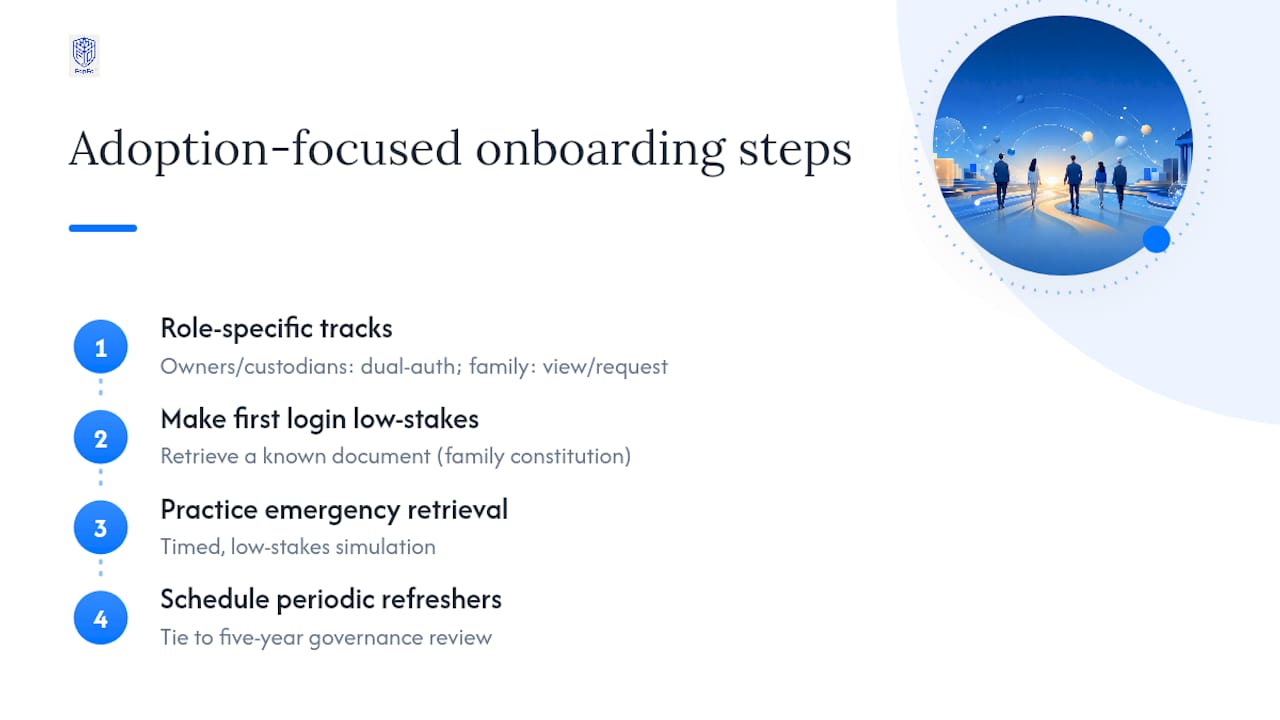
Start training with the people who touch the system under stress, not the people who built it. A trustee who only logs in once a year needs a shorter, simpler walkthrough than a primary custodian who works in the system weekly. Separate training tracks by role: owners and custodians need deep training on dual‑authorization workflows, while extended family members mostly need to know how to view their own records and request access.
Make the first login low‑stakes. Have each family member retrieve one document they already know exists, like their own copy of the family constitution, rather than starting cold with an unfamiliar interface. Confusion during onboarding is often mistaken for a complaint about the platform itself, when it's really a complaint about a missing five‑minute walkthrough.
Build the emergency retrieval test into training, not around it. When trustees have actually practiced the retrieval protocol once, under time pressure, in a low‑stakes simulation, they respond faster and with less panic when a real event happens. This is also where the documented five‑year review cycle for governance documents pays off: refresher training tied to that same cadence keeps the system from becoming something people learned once and then forgot.
What Does a Succession Data Room Cost to Implement?
Costs break into three buckets: setup, licensing, and ongoing maintenance, and the biggest variable by far is the document inventory phase, not the software itself.
Setup costs scale with document volume and jurisdictional complexity. A single‑entity family with a modest document set spends far less time and money than a multi‑entity office spanning several countries, where the inventory phase alone can run months of advisor and staff time. Ingestion and verification, the scanning, certifying, and cross‑checking of originals against the inventory, is typically the second‑largest line item.
Licensing for a family‑office grade platform usually follows one of two models: a one‑time purchase per application or module, or a discounted bundle covering the full suite. On top of licensing, expect an annual service and maintenance subscription that covers updates, support, and security patching. This is not optional if you want the platform to stay current with encryption standards and jurisdictional rule changes.
The line families most often underspend on is the annual independent audit. It's a recurring cost, not a one‑time setup fee, and skipping it to save money defeats the purpose of building the data room in the first place. Budget for it the same way you'd budget for portfolio rebalancing: as a fixed, recurring line, not a discretionary extra.
Which Vendors Should Family Offices Actually Consider?
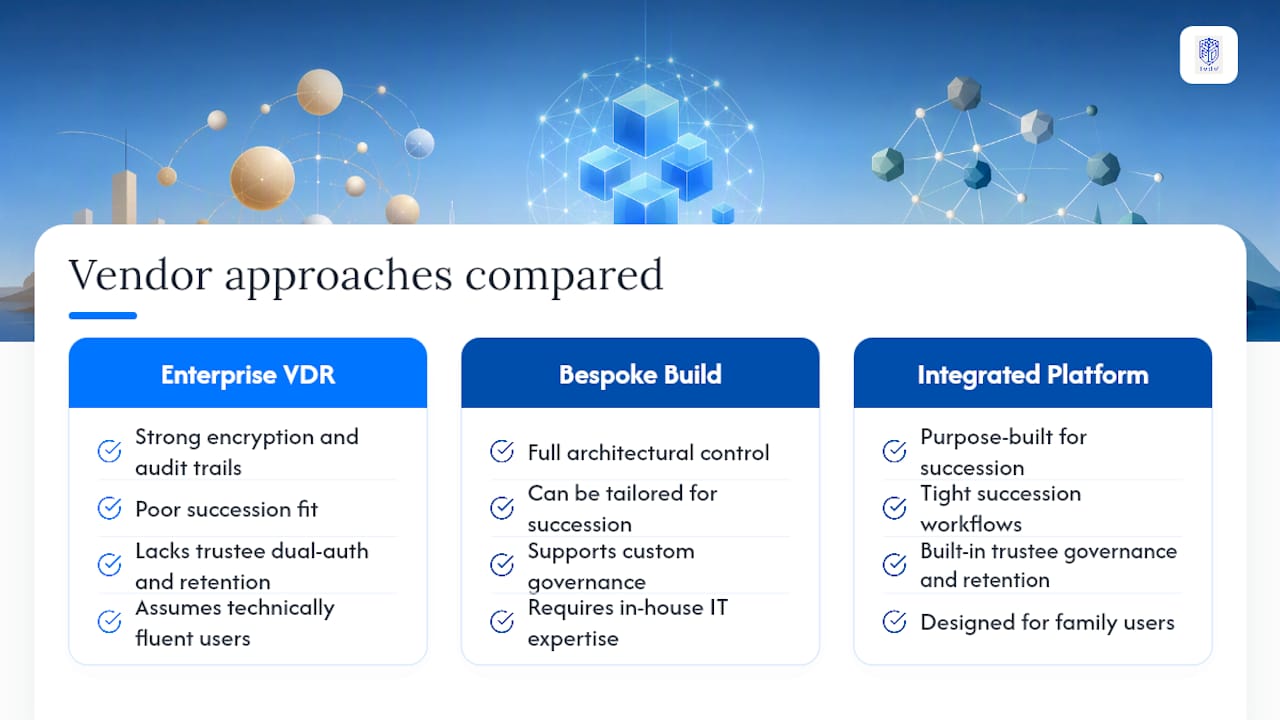
Family offices generally choose between three approaches: a generic enterprise virtual data room repurposed for family use, a bespoke build managed by internal IT, and an integrated family‑office platform purpose‑built for succession.
Generic enterprise VDRs, the kind built for M&A due diligence, offer strong encryption and audit trails but rarely support the family‑specific governance layer: dual‑authorization tuned to trustee roles, or a retention matrix that understands trust law rather than corporate deal timelines. They also tend to assume a technically fluent user base, which doesn't describe most extended family members.
Bespoke internal builds give full control over architecture but put the burden of jurisdictional redundancy, key management, and audit logging entirely on the family office's own IT resources. That's a heavy, ongoing commitment for a function that only gets exercised in a real emergency once every decade or two.
Full Option Family Office's integrated suite takes a third path, built specifically around succession rather than adapted to it: BoxAlong™ for asset and holdings management, Familigi™ for mapping family structure and genealogy against governing documents, Currencida™ for tracking multi‑currency and crypto holdings, and SEBAA™ for benefits and payroll continuity. The trade‑off with any integrated platform is less flexibility to swap individual components, weighed against tighter fit for succession‑specific workflows out of the box.
Do You Still Need a Lawyer if You Have a Data Room?
A data room organizes documents. It doesn't draft them, interpret them, or resolve a dispute over what a trustee letter of wishes actually means. That distinction matters more than most families realize when they're evaluating platforms.
The strongest setups treat the data room as the operational layer sitting underneath legal advisory work, not a replacement for it. Your estate attorney still drafts the will. Your trust counsel still structures the trust. The data room's job is to make sure those documents, once drafted, are stored correctly, tiered appropriately, and retrievable within minutes rather than days when someone actually needs them.
Integration works best when the data room can hold a live link between an asset and its governing instrument: a specific holding tagged directly to the trust deed that controls it, rather than a folder of PDFs with no relationship mapped between them. SideDrawer's model of a single‑source vault for wealth managers illustrates this well: resolving version fragmentation across lawyers, accountants, and trustees is often the real value, more than storage capacity itself.
Coordinate the review cadence too. If your estate attorney reviews the will every few years but the data room's classification tags never get updated to match, the two systems drift apart quietly until an emergency exposes the gap.
How Full Option Family Office Approaches Succession Data Rooms
We built Full Option Family Office around the four‑tier taxonomy families actually need, not a generic file‑sharing model retrofitted for wealth. Familigi™ maps family structure directly to governing documents, so a trust deed is never just a PDF sitting in a folder disconnected from the person it governs.
BoxAlong™ and Currencida™ handle the asset side, tracking holdings and currencies (including crypto) against the legal instruments that control them, which cuts the administrative drift that creeps in when spreadsheets and legal files live in separate systems. SEBAA™ extends that same structure to benefits and payroll continuity.
The result is fewer places for a tier‑one document to go missing, and audit reports that reflect the family's actual structure rather than a generic template.
Ready to Build a Succession‑Ready Data Room?
Reading a checklist gets you organized on paper. Full Option Family Office gets your family's actual documents into a system built for the four‑tier taxonomy this guide just walked through, with dual‑authorization and jurisdictional redundancy configured from day one instead of bolted on later.
The engagement is straightforward: a discovery call to map your current document landscape, a scoped pilot covering inventory and ingestion for your highest‑priority entities, a tested emergency retrieval run, and an annual audit subscription to keep the whole system defensible year over year. Because Familigi™, BoxAlong™, Currencida™, and SEBAA™ already work together, you're not stitching four vendors into one workaround. Visit the Full Option Family Office platform to see how the suite maps to your family's structure, and book a demo to scope your pilot.
Sources
- Getting succession right: How family offices are preparing for the next generation | CFA Institute
- Document Governance for Family Offices: A Practical Guide
- The Essential Guide to What Documents to Keep and How Long to Save Them
- Estate administration checklist: what to do after the loss of a loved one