

The fastest way to stay on top of multiple retirement accounts is one consolidated tracker that records per-account year-to-date deferrals separately from employer match, checks both against the 2026 IRS limits, and shows your allocation across every account at once. Start today: pull your latest paystub or log into each plan portal and write down your year-to-date employee deferrals for every account you hold. Do that first, then build the rest of the system around it.
TL;DR:
- Tracking all retirement accounts requires recording account type, provider, balance, YTD employee contributions, employer match, and vesting status to ensure accurate progress against limits.
- The 2026 contribution limits are $24,500 for 401(k) and 403(b) plans, $7,500 for IRAs, with additional catch-up contributions available for those over 50, and remaining room should be calculated regularly.
- Employer matches do not reduce your elective deferral limit but are subject to a separate, larger overall cap, and plans with no true-up can cause missed match dollars if contributions are front-loaded.
- Regularly reconciling paystub deductions with plan portal data and consolidating accounts prevents tracking errors, especially when managing multiple employers, old accounts, or currency types.
- Automating account data import, setting personalized contribution alerts, and maintaining data security through read-only access streamline management and protect long-term retirement information.
Table of Contents
- Retirement Contributions Tracking: What to Record Per Account
- How Much Can You Still Contribute in 2026?
- Employer Match, Combined Limits, and True-Up Timing
- Finding Lost Accounts and Keeping Clean Records
- Building a Consolidated Allocation Snapshot
- [What Will Your Contributions Actually Be Worth? Read more about retirement income strategies for Australians to optimize your projections and withdrawal plans.](#what-will-your-contributions-actually-be-worth-read-more-about-retirement-income-strategies-for-australianshttpsaerowealthnetblogretirement-income-strategies-for-australians-2026-guide-to-optimize-your-projections-and-withdrawal-plans)
- Rolling Retirement Accounts Into Your Net Worth View
- Common Retirement Tracking Mistakes and Quick Fixes
- How an Integrated Platform Cuts Reconciliation Time
- Tips for Automating Retirement Contributions Tracking
- Tracking Tax Implications: Pre-Tax vs. Roth Contributions
- Adjusting Contributions When Income or Jobs Change
- How Often Should You Update Your Tracker?
- Keeping Retirement Accounts Secure When Tracking Online
- A Few Habits That Make Annual Tracking Painless
- See How Full Option Family Office Simplifies Multi-Account Tracking
- Primary Sources for Official Limits
- Sources
- FAQ
Retirement Contributions Tracking: What to Record Per Account
A tracker only works if it captures the right fields for every account, not just the balance. Miss one field and you lose the ability to reconcile your progress against the 2026 limits or catch an employer match you're leaving on the table.
For each retirement account, record:
- Account type (401(k), 403(b), Traditional IRA, Roth IRA, SEP)
- Provider and account nickname (so "Fidelity 401k" doesn't get confused with an old employer's plan)
- Current balance as of your last statement
- Year-to-date employee contributions, also called elective deferrals
- Employer match year-to-date, tracked in its own column
- Catch-up contributions, if you're 50 or older
- Last statement date, so you know how fresh the number is
- Vesting status for employer contributions
Find these figures on your plan portal's contribution history tab, your most recent statement, or the deduction lines on your paystub. If HR can't answer a vesting question, plan documents usually can. Flag rollovers, Roth conversions, and any post-tax contributions separately. They don't count against your elective deferral limit, and lumping them in will throw off your pacing math.
How Much Can You Still Contribute in 2026?
The 401(k) elective deferral limit rises to $24,500 for 2026, up from the prior year, and applies to 403(b) plans too. IRA contributions cap at $7,500. Savers 50 and older get an extra $8,000 catch-up for 401(k)/403(b) plans and an extra $1,100 for IRAs.
Calculating your remaining room takes three steps:
- Pull your year-to-date elective deferrals from your plan portal.
- Subtract that number from your applicable 2026 cap ($24,500 for a 401(k), $7,500 for an IRA, plus catch-up if eligible).
- Divide the remainder by the number of pay periods left in the year to get your per-paycheck target.
Quick math: A 52-year-old earning biweekly pay who has deferred $14,000 by August with 10 pay periods left needs to hit the $24,500 cap plus an $8,000 catch-up, for a $32,500 total ceiling. That leaves $18,500 to contribute, or $1,850 per paycheck for the rest of the year.
If you hold accounts at two employers, sum your deferrals across both. The IRS caps your total elective deferrals across all 401(k) plans combined, not per plan.
Employer Match, Combined Limits, and True-Up Timing
Employer match does not count against your $24,500 elective deferral limit. It falls under a separate, larger combined cap covering both your contributions and your employer's, per IRS rules on operating a 401(k) plan. Confusing the two is one of the most common tracking mistakes multi-account savers make.
To capture the full match:
- Record employer match YTD in its own tracker column, never blended with your deferrals.
- Calculate how much match you've earned versus what your plan formula promises for the full year.
- Check whether your plan performs a year-end true-up, since front-loading deferrals early in the year can cause you to miss match dollars if your plan doesn't true up.
Pro Tip: Call HR or read your summary plan description before you max out contributions early. A plan without true-up provisions rewards spreading deferrals evenly across all 26 or 24 pay periods, not front-loading them.
Finding Lost Accounts and Keeping Clean Records
Old 401(k)s from former employers are easy to lose track of, especially after two or three job changes. A structured search and a consistent filing habit solve most of the problem permanently.
To locate old accounts:
- Contact former employer HR departments or plan administrators directly.
- Search the National Registry of Unclaimed Retirement Benefits using your Social Security number.
- Dig up old statements or paystubs that name the plan provider.
Once found, decide whether to roll the old plan into your current employer's 401(k) or into an IRA. Compare fees, investment options, and whether keeping it separate preserves any special protections. For recordkeeping, create one folder per account year, named with the provider and year (example: "Fidelity_401k_2026"), and drop in every statement and contribution confirmation as it arrives.
Building a Consolidated Allocation Snapshot
Multiple accounts often mean duplicate exposure you don't notice until you map everything together. Someone holding a target-date fund in one 401(k) and an S&P 500 index fund in an old IRA might think they're diversified, when both are heavily concentrated in the same large-cap stocks.
Sort each account's holdings into four buckets: equities, fixed income, cash, and alternatives. Then calculate your weighted-average allocation across every account combined, not account by account.
- List each holding's dollar value and bucket assignment.
- Sum by bucket across all accounts to find your true blended allocation.
- Watch for concentration risk when the same underlying fund shows up in two different accounts under different names.
Once you see the real picture, direct new contributions toward whichever bucket is underweight rather than rebalancing by selling. New money is simpler and avoids triggering trades inside tax-advantaged accounts.
What Will Your Contributions Actually Be Worth? Read more about retirement income strategies for Australians to optimize your projections and withdrawal plans.
The 4% rule offers a quick way to translate your retirement savings into an income figure: divide your desired first-year retirement income by 0.04 to get your target portfolio size. Want $60,000 a year in retirement? You're aiming for $1.5 million.
To project where your current contributions land you, use the future value of a growing savings stream:
- Estimate your annual contribution total across all accounts (your deferrals plus employer match).
- Apply an assumed annual growth rate, commonly 6% to 7% for a diversified portfolio.
- Compound that forward to your target retirement age.
Worked example: Someone contributing $15,000 per year combined across accounts, starting at age 35 with a 7% average return, reaches roughly $1.5 million by 65. That's before accounting for any employer match growth on top.
If the number falls short, three levers move it: raise your contribution rate, work a few extra years, or shift allocation toward more growth assets earlier. Every projection depends on assumptions holding steady, and market returns rarely move in a straight line, so treat the output as a planning compass, not a guarantee.
Rolling Retirement Accounts Into Your Net Worth View
Retirement balances shouldn't live in a separate mental bucket from the rest of your net worth. Surface three fields on your net worth dashboard: current balance, YTD contributions, and remaining contribution room for each account. That combination tells you both where you stand and what's still possible before year-end.
Useful visuals include a balance trend line over time, a stacked area chart showing account type breakdown, and a simple table of remaining room by account. A family office dashboard built around monthly updates keeps this from becoming a once-a-year scramble.
Set aside 10 minutes monthly to reconcile your paystub deductions against what shows up in each plan portal, and log any changes immediately.
Common Retirement Tracking Mistakes and Quick Fixes
Most tracking errors repeat across households, and each one has a fast fix once you know what to look for.
- Counting employer match as your own deferral: Split match into its own column immediately.
- Losing count across multiple plans: Sum deferrals across all employers monthly, not just at tax time.
- Missing true-up rules: Read your plan document or ask HR directly rather than assuming a true-up exists.
- Forgetting old accounts: Label every account with provider and purpose the moment you open your tracker, and set a calendar reminder to check for stray 401(k)s annually.
How an Integrated Platform Cuts Reconciliation Time
Manually cross-referencing five account portals every month gets old fast, especially once you're tracking deferrals, match, catch-up, and allocation simultaneously. Unified reporting that imports YTD figures directly from each account, flags when you're approaching an IRS limit, and exports certified records removes most of the manual reconciliation work.
Look for a platform that offers:
- Multi-account YTD import instead of manual data entry per provider
- Limit-aware alerts tied to current-year IRS caps
- Multi-currency support if you hold accounts across borders
- Exportable audit trails for tax season or advisor reviews
If you're evaluating a platform, ask for a demo showing a real YTD import, how it handles catch-up contributions for savers 50 and up, and what an exported audit trail actually looks like before committing.
Tips for Automating Retirement Contributions Tracking
Manual tracking works until you're managing four or five accounts, at which point automation stops being a convenience and becomes a necessity. Start by linking every account to whatever tracker or budgeting app you use so balances and contribution histories pull in automatically instead of requiring manual entry after each paycheck.
Set up alerts tied to your specific limits, not generic ones. A 401(k) approaching the $24,500 cap needs a different alert threshold than an IRA capped at $7,500, and catch-up eligibility changes both numbers if you're 50 or older. Most plan portals let you set contribution percentage changes in advance, which means you can schedule an increase for January without having to remember to log in.
Calendar reminders fill the gaps automation misses. Set one for each open enrollment period, one for a mid-year contribution pace check around June, and one for early December to catch any last chance to hit your annual max before the final paycheck of the year processes.
Spreadsheet templates work fine for two or three accounts, but they require you to manually update every field, every month, across every provider. That manual step is where most tracking gaps start. A tool that pulls YTD deferral data directly from linked accounts removes the update step entirely and just needs a periodic glance to confirm figures still make sense.
That buffer gives you time to adjust your last few paychecks before the year runs out, rather than discovering in December that you're already maxed and can't hit the full amount.*
Tracking Tax Implications: Pre-Tax vs. Roth Contributions
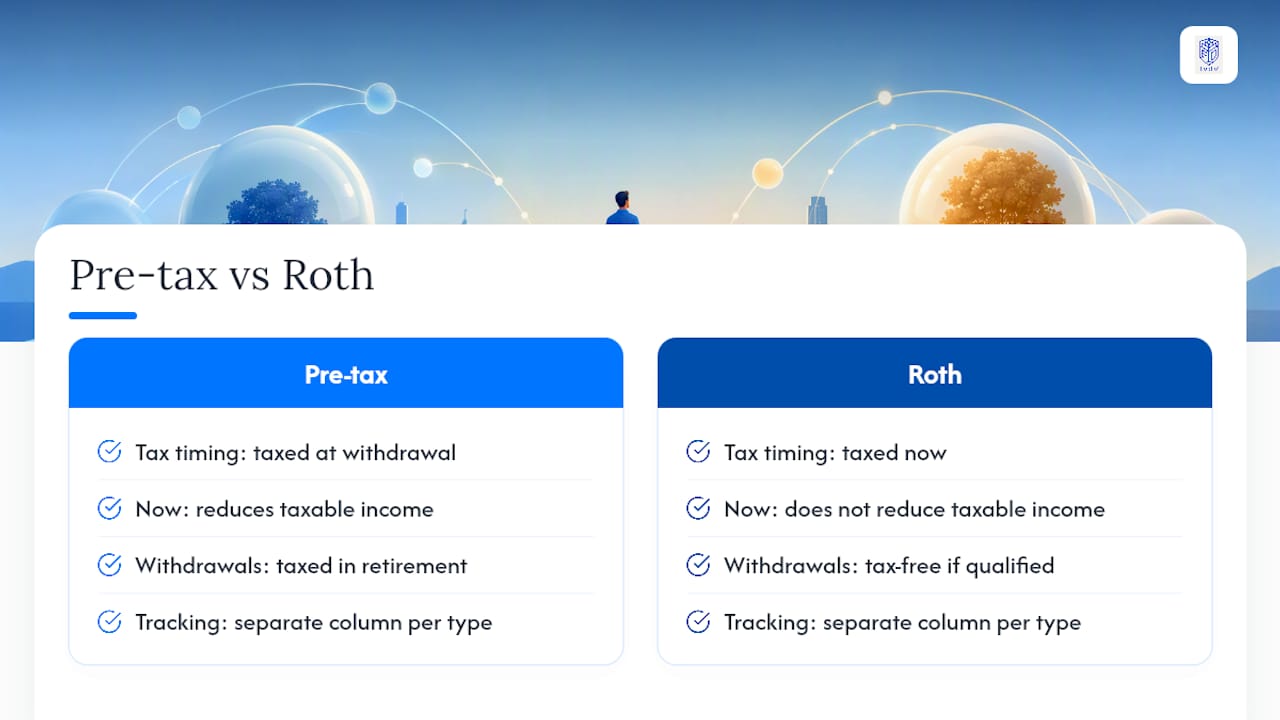
Pre-tax and Roth contributions hit your paycheck differently, and your tracker needs to separate them or your tax picture gets muddled fast. Pre-tax deferrals to a traditional 401(k) or IRA reduce your taxable income now, with taxes due when you withdraw in retirement. Roth contributions get taxed today but grow and withdraw tax-free later, assuming you meet the holding period and age requirements.
Track each contribution type in its own column, even within the same account, since many plans now let you split contributions between pre-tax and Roth within a single 401(k). Mixing them into one combined balance makes it impossible to calculate your taxable income accurately at year-end or to project your future tax liability in retirement.
The $24,500 elective deferral limit applies across pre-tax and Roth contributions combined within the same account type, not separately to each. If you contribute $15,000 pre-tax and $10,000 Roth to the same 401(k), you've used $25,000 of your cap, which means you've actually exceeded the 2026 limit by $500 and need to have that corrected before the tax filing deadline.
IRA contributions carry their own separate tracking wrinkle: Traditional and Roth IRA limits share one combined cap, and Roth IRA eligibility phases out at higher income levels while Traditional IRA deductibility phases out separately based on whether you're covered by a workplace plan. Someone maxing out a Roth IRA needs to check their income against the phase-out range before assuming the full $7,500 is available to them.
For anyone holding both pre-tax and Roth accounts, keep a running total of taxable versus tax-free balances. That split matters enormously when you're deciding withdrawal order in retirement and trying to manage which tax bracket you land in each year.
Adjusting Contributions When Income or Jobs Change
A raise, a job switch, or a period of reduced income all call for revisiting your contribution rate, and waiting until the next open enrollment period to make that adjustment costs you months of lost progress. When income rises, the simplest move is increasing your contribution percentage by the same amount as the raise, so the higher paycheck never gets a chance to adjust your spending habits before the extra savings are locked in.
Job changes require immediate action on your tracker. The moment you leave an employer, your access to that plan's active contribution changes, though the account itself keeps whatever vested balance you've built. Log the account as "inactive" in your tracker rather than deleting it, decide whether to roll it into your new employer's plan or into an IRA, and make sure your new employer's contributions start showing up in your tracker from day one rather than after your first quarterly review.
A period of reduced income, whether from a layoff, a career change, or taking leave, calls for the opposite adjustment. Dropping your contribution rate to capture at minimum the full employer match, rather than stopping contributions entirely, preserves the free money while giving your budget room to breathe. Update your tracker immediately when you make this change so your year-end projections reflect reality instead of an outdated contribution rate that no longer applies.
Self-employment or freelance income adds another layer, since SEP IRA or Solo 401(k) contribution limits work differently and often depend on net business income rather than a fixed salary. Recalculate your available contribution room whenever your income estimate shifts meaningfully during the year, not just at tax time when it's too late to adjust.
How Often Should You Update Your Tracker?
A monthly cadence catches problems while they're still fixable. Reconciling your paystub against your plan portal once a month takes about 10 minutes and reveals whether your contribution pace still lines up with your remaining 2026 limit.
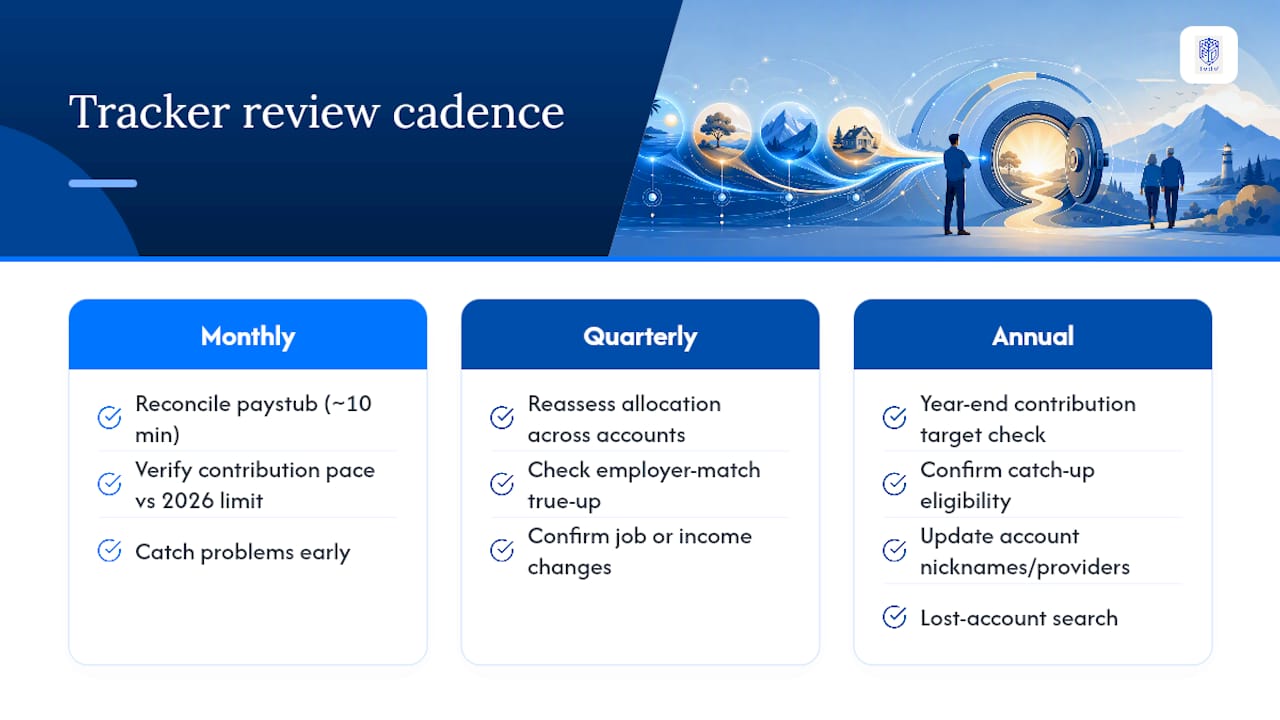
Quarterly reviews serve a different purpose: reassessing your allocation across accounts, checking whether any employer match true-up is on track, and confirming that a job change or income shift hasn't left an account stale.
Annual reviews, done in late November or early December, focus on year-end mechanics: confirming you'll hit your target contribution before the last paycheck processes, checking for any catch-up eligibility you haven't used, and updating account nicknames or provider information that changed during the year. This is also when a lost-account search pays off, catching any old 401(k) that slipped through since your last annual sweep.
Skipping monthly checks in favor of only annual reviews is the single most common reason people miss their contribution targets. By the time December arrives, there often aren't enough pay periods left to correct course.
Keeping Retirement Accounts Secure When Tracking Online
Linking retirement accounts to a tracker or budgeting app means handing over login credentials or read-only access to your most consequential long-term savings, so security deserves the same attention you'd give online banking. Use two-factor authentication on every plan portal that offers it, and treat any tracker requesting your credentials without a clear security policy as a red flag.
Read-only account aggregation, where a tool can view balances and transaction history but can't move money or change beneficiaries, is meaningfully safer than granting full access. Check whether your chosen tracker specifies this distinction before connecting an account.
Data ownership matters just as much as access control. Confirm you can export your full contribution history and balance data if you ever switch tools, rather than discovering your years of tracked records are locked inside a platform you can no longer use. A platform that stores data with strong encryption and lets you control exactly what gets shared, and with whom, protects both your privacy and your family's financial picture if you're tracking accounts on behalf of a spouse or aging parent.
Avoid tracking sensitive account numbers or full Social Security numbers in unsecured spreadsheets, especially ones stored in shared cloud folders. The convenience of a shared family spreadsheet isn't worth the exposure if that file ever gets accessed by the wrong person.
A Few Habits That Make Annual Tracking Painless
A monthly snapshot, done the same day each month with a 10-minute checklist, beats any once-a-year scramble. Automated reminders and one labeled folder per account keep the whole system accurate without much upkeep.
— GCA
See How Full Option Family Office Simplifies Multi-Account Tracking
Spreadsheets work until you're juggling five accounts, three currencies, and a spouse who wants visibility without learning your formulas. A unified platform brings retirement holdings into the same view as the rest of your family's assets, offering flat-fee pricing rather than fees that scale with account balances.
The suite covers what a scattered spreadsheet system can't: one application handles unified holdings tracking across various account types, another manages contributions and balances across physical, virtual, and crypto currencies, and another is built specifically for benefits, payroll, and savings and investing management, including contribution and match tracking. A family tree application ties everything together with family tree context, useful for multi-generational households coordinating retirement planning across several people.
Every plan comes with full data ownership and export, so your contribution history never gets locked inside a platform. Support runs in 15 languages, including right-to-left scripts, for families managing accounts across borders. If you want to see what a real YTD import and a certified export actually look like, request a demo through the solutions page and bring your own account list to test against it.
Primary Sources for Official Limits
Confirm every figure directly with the IRS newsroom on 2026 contribution limits and IRS Publication 969 for account-specific tax treatment. For hands-on pacing math, a contribution tracker tool shows the calculation in practice.
Sources
- 401(k) limit increases to $24,500 for 2026; IRA limit increases to $7,500
- 401(k) Contribution Tracker — 2026 Annual Progress
FAQ
How Do I Keep Track of Multiple Retirement Accounts?
Build one tracker with a row per account that records provider, current balance, YTD employee deferrals, and employer match in separate columns. Update it monthly by comparing your paystub deductions against each plan portal, which catches true-up timing issues before they cost you match dollars.
Does the IRS Track My Roth IRA Contributions?
The IRS receives contribution reporting from your IRA custodian each year, but it doesn't proactively warn you if you exceed the limit. You're responsible for tracking your own contributions against the $7,500 IRA cap and correcting any excess before the tax filing deadline.
What Percentage of People Retire With $1,000,000?
Reaching seven figures in retirement savings depends heavily on income, contribution rate, and years invested, and it isn't the norm for most workers. Consistent contributions tracked against the 4% rule give a clearer sense of whether your specific savings pace puts you on track for your own target, rather than a generic milestone.
Is $400,000 Enough to Retire at 62?
The 4% rule helps translate your portfolio size into sustainable first-year retirement income, but whether it's enough depends entirely on your expected expenses and other income streams, not the balance alone. Whether it's enough depends entirely on your expected expenses and other income streams, not the balance alone.
What Does GCA-FopFo Cost?
Each application, including SEBAA™ for benefits and savings tracking, is priced individually or as part of a discounted suite, with current pricing listed on the solutions page. A separate annual service and support subscription runs $90 per year per account, covering updates, support, and the newsletter.