

The right setup for portfolio alerts for families rests on four categories: security alerts, event alerts, strategy alerts, and tax-opportunity alerts. Security alerts route only to the authorized responder who can lock an account. Strategy and tax alerts go to the investment lead or family office team. Every connection should be read-only, and delivery should split between instant push or SMS for urgent items and a weekly digest for everything else.
TL;DR:
- Security alerts should be prioritized for fraud prevention, focusing on large transfers, new devices, and suspicious login activity.
- Alerts must be role-specific, with primary owners handling fraud, while family office teams and advisors receive tailored event, strategy, or opportunity notifications.
- Notification channels should match alert urgency, using push or SMS for security, email for routine events, and weekly summaries for non-urgent information.
- Setting thresholds based on percentage drift and idle cash levels helps prevent false positives, with timed suppression windows to reduce alert noise.
- A unified, role-based platform with read-only access ensures correct alert routing, reduces alert fatigue, and maintains privacy through encryption and proper consent protocols.
Table of Contents
- What Portfolio Alert Types Matter for Families?
- Who Should Receive Which Alerts?
- How Do You Set Notification Channels and Thresholds?
- Practical Setup Checklist: Configure Alerts Step by Step
- Governance and Escalation: Who Acts and How
- How Do You Avoid Alert Fatigue?
- Legal and Privacy Considerations for Sharing Alerts
- Which Platforms Actually Handle Family Portfolio Alerts Well?
- Governance-First Alert Design Is the Practical Default
- Simplify Family Portfolio Alerts With One Connected Platform
- Sources
- FAQ
What Portfolio Alert Types Matter for Families?
Families manage more moving parts than a single investor ever does. Trusts, custodial accounts, joint holdings, and outside advisors all generate activity, and each type of alert protects a different piece of that structure.
Security and fraud alerts catch the events that matter most urgently: large transfers, unusual login locations, or new linked bank accounts. FINRA warns that scammers increasingly use chat groups to prime family members with fake stock tips before requesting a wire transfer, which is exactly the kind of activity a fraud alert should flag before money moves.
Event alerts cover the routine mechanics of holding investments: dividend payments, executed trades, bond maturities, and option expirations.
Strategy alerts flag drift from the family's intended plan, such as a single position growing too large or cash sitting idle instead of earning a return. Family offices actively reposition portfolios in response to sector and geographic shifts, and a strategy alert is what catches that movement before it becomes a bigger problem.
Opportunity alerts surface tax-loss harvesting windows and fee-reduction opportunities that a busy family might otherwise miss.
- Security/fraud: large transfers, new devices, failed login attempts
- Event: dividends, trade confirmations, maturities
- Strategy: allocation drift, concentration risk, idle cash
- Opportunity: tax-loss harvesting, fee audits
Families with real estate, crypto, or multiple entities need this even more, since a single missed alert can hide in the noise of a multi-entity reporting structure.
Pro Tip: Tag each alert with the account or entity it belongs to before you turn it on. A fraud alert that just says "large transfer" is far less useful than one that says which trust or account triggered it.
Who Should Receive Which Alerts?
Not every family member needs every alert, and sending all of them to everyone is how important ones get ignored. A simple role structure fixes this.
- Primary owner or trustee receives fraud alerts and has authority to freeze accounts.
- Investment lead (often a spouse or adult child with financial responsibility) receives strategy and opportunity alerts.
- Family office admin receives everything, for recordkeeping and escalation.
- External advisor receives event alerts relevant to accounts they manage, nothing more.
- Other family members get digest summaries only, with no ability to act on individual alerts.
The critical technical piece is a read-only integration between the alerting system and the actual accounts. Greenlight's family monitoring approach links accounts through connections like Plaid specifically so the monitoring layer can never move money, only watch it. A role-based access model applied to alerts, not just logins, keeps this clean.
Pro Tip: Walk through a fraud scenario once with your family before you need it. If a large transfer alert fires late at night, everyone should already know who gets the text and who has authority to lock the account.
How Do You Set Notification Channels and Thresholds?
Urgency should decide the channel; for practical monitoring tips to fit busy schedules, see our busy investor portfolio monitoring tips guide. A fraud alert buried in a weekly email digest defeats the point of having one.
- Push or SMS: reserved for security alerts and anything requiring same-day action.
- Email: event alerts like dividend payments or trade confirmations, where a delay of a few hours costs nothing.
- Weekly digest: strategy and opportunity summaries for family members who monitor but don't act directly.
For thresholds, percentage-based rules scale better than fixed dollar amounts as the portfolio grows. A common approach flags allocation drift above roughly 3 to 5 percent from target, and idle cash once it exceeds a few percent of investable assets. Set suppression windows so a volatile trading day doesn't trigger the same drift alert five times before noon. For multigenerational households spread across time zones, route non-urgent digests to arrive during each recipient's normal morning hours rather than firing at the moment a market event happens.
Practical Setup Checklist: Configure Alerts Step by Step
Getting a family alert system running is less about technology and more about sequencing. Do the steps in this order and you avoid the most common mistake, which is turning on too many alerts before anyone knows who owns them.
- Inventory every account across custodians, entities, and asset types, then connect each through a read-only integration.
- Turn on security alerts first and assign a named responder to each account, not just a role title.
- Set allocation, concentration, and idle-cash thresholds based on the family's actual liquidity needs, not a generic default.
- Enable tax-opportunity and fee alerts, and schedule a weekly digest for non-executive family members.
- Test everything for 30 days before treating any threshold as final, and adjust based on what actually triggered versus what was noise.
PortfolioPilot's approach to alert design reinforces a useful principle here: alerts should surface rare, genuinely actionable moments and give a direct path to act, not just a notification to read and dismiss.
Pro Tip: Run your 30-day test with a shared log. Write down every alert that fired and whether it led to a real action. Anything with a 0 percent action rate after a month gets its threshold adjusted or gets turned off.
Governance and Escalation: Who Acts and How
Alerts without a decision framework behind them just create anxiety. The fix is building alert response directly into the family's governance documents rather than leaving it to whoever happens to see the notification first.
Cambridge Associates recommends that private families formalize decision authority in an Investment Policy Statement, and that same document is the right place to define who confirms an alert and who can lock an account. Build these practices around it:
- Name specific individuals, not just roles, for each alert type in the IPS.
- Require one-tap or one-call verification before any account gets frozen on a fraud alert.
- Log who received each alert, who confirmed it, and what action followed, creating an audit trail for later review.
- Revisit thresholds and routing rules at least once a year, since family liquidity needs and portfolio size both change.
Consistent KPI reporting alongside alert logs gives the next governance review something concrete to work from.
How Do You Avoid Alert Fatigue?
The single biggest threat to a family alert system isn't a missed fraud attempt. It's a family that stops reading alerts because too many of them didn't matter.
- Tie every alert to one clear next action; if there's no decision to make, it belongs in a digest, not a push notification.
- Use suppression windows so a single volatile event doesn't generate five duplicate alerts in one afternoon.
- Review false positives every quarter and retire or adjust the rules that keep firing without leading to action.
- Add rules-based filtering only if it measurably cuts down the number of alerts a human has to review, not just to sound sophisticated.
Pro Tip: If a specific alert type gets ignored three times in a row, that's a signal the threshold is wrong, not that the family member is being careless.
Legal and Privacy Considerations for Sharing Alerts
Family financial alerts touch account numbers, balances, and transaction details, all of which carry real privacy weight once they're shared beyond the account holder. A trust beneficiary, a minor child's custodial account, or a spouse's separate property may each carry different disclosure rules depending on account type and jurisdiction, so a single blanket sharing policy is rarely the right answer.
Before routing alerts widely, confirm who legally has a right to see what. A trustee typically has fiduciary access to trust account activity, but a beneficiary may not, and an adult child added as an emergency contact isn't automatically entitled to see every transaction. Custodial accounts for minors usually route entirely to the custodian, not the child, until the account transfers at the age of majority set by the account's state.
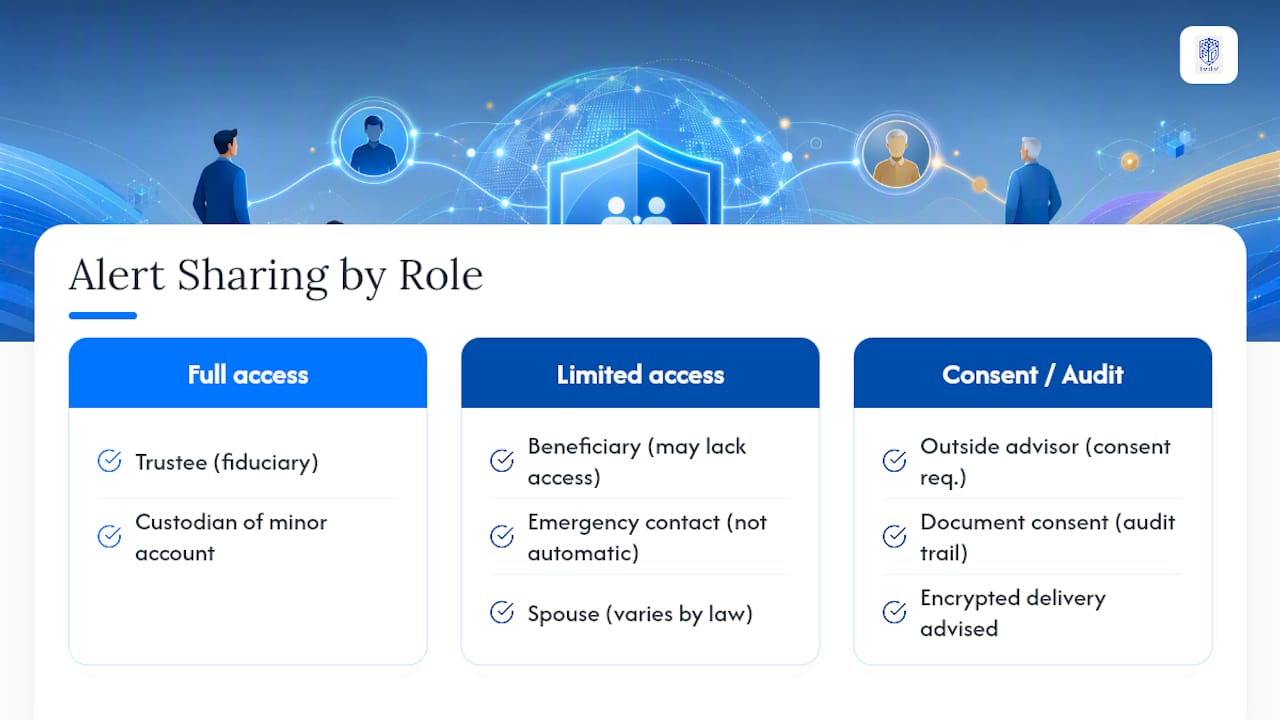
Encryption and access controls matter as much as the routing rules themselves. FINRA specifically warns against sharing account details or accepting investment instructions through unsecured chat platforms, since scammers exploit exactly those channels to impersonate family members or advisors. An alert system with proper authentication and encrypted delivery closes that gap far better than a group text thread ever will.
Document who consented to receive what, especially for extended family or outside advisors added to the notification list. That consent record becomes part of the same audit trail that supports governance reviews, and it protects the family if a dispute over access ever arises later.
Which Platforms Actually Handle Family Portfolio Alerts Well?
Most consumer brokerage apps handle alerts for one account, one owner. Families need something built for multiple accounts, multiple owners, and multiple levels of access, which is a different design problem entirely.
A platform suited to family alerting needs to do a few things a single-account app never will: aggregate holdings across custodians and entity types, apply read-only connections so monitoring never becomes a trading risk, and let an admin assign different alert categories to different people without giving everyone the same inbox.
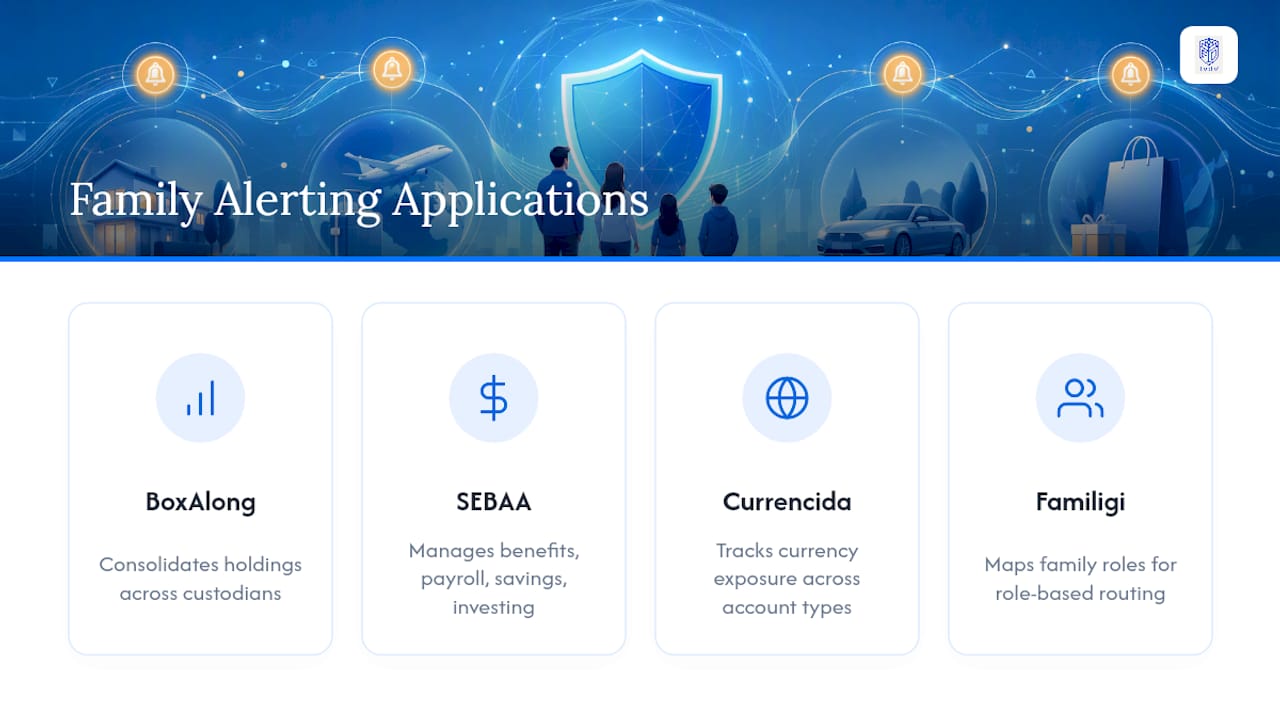
Full Option Family Office approaches this through four integrated applications built for exactly this structure. BoxAlong™ consolidates asset and holdings data across accounts and entities so alerts have one consistent source of truth instead of pulling from disconnected custodian feeds. SEBAA™ handles benefits, payroll, savings, and investing management, which is where strategy and opportunity alerts naturally live. Currencida™ tracks currency exposure across physical, virtual, and crypto accounts, useful for families with holdings that cross borders or asset classes, and pairs well with dedicated FX exposure tracking practices. Familigi™ maps the family tree itself, which is what makes role-based routing possible in the first place: the system knows who is a trustee, who is a beneficiary, and who is an outside advisor before a single alert ever fires.
Governance-First Alert Design Is the Practical Default
Families that treat alerts as a security tool first and a convenience second end up with fewer false alarms and faster fraud response. Role-based routing and read-only monitoring aren't extra steps. They're what keeps a notification system from becoming a liability of its own. Families serious about this should start with a written governance template, then test it against a real platform before rolling it out to every account.
— GCA
Simplify Family Portfolio Alerts With One Connected Platform
Running separate alert settings across multiple custodians and advisors is how important notifications get lost. A unified platform can bring multi-account monitoring, role-based alert routing, and event and tax-opportunity notifications into one connected system, so a fraud alert reaches the right responder in seconds instead of getting buried in an inbox shared by multiple people.
The four integrated modules work together instead of as separate logins: one application maps who belongs in which role, another tracks the holdings those roles need visibility into, a third watches currency and crypto exposure, and a fourth manages the benefits and investing side of the family's financial life. Weekly digests keep non-executive family members informed without flooding their phones, while the authorized responder still gets instant alerts on anything urgent.
Ready to see it running against your own accounts? Request a demo and import your family's governance settings to test alert templates before committing to a full rollout.
Sources
- Investment group imposter scams | FINRA
- Tutorial: Portfolio Alerts | PortfolioPilot
- Portfolio construction: a blueprint for private families | Cambridge Associates
FAQ
How Do You Track a Family Portfolio Across Multiple Accounts?
Connect every account through read-only integrations into a single aggregation platform, then apply role-based alert routing so the right family member sees the right activity without gaining trading access.
What Is the Minimum Net Worth to Have a Family Office?
There's no fixed legal minimum, but full single-family offices typically make sense for very large investable assets; families below that size commonly use software platforms or multi-family arrangements to get similar oversight at lower cost.
Why Are All My Investments Losing Value at the Same Time?
Broad, simultaneous losses usually reflect a market-wide downturn or heavy concentration in correlated assets rather than a problem specific to one holding. A strategy alert for concentration risk is designed to flag that kind of correlated exposure before a downturn hits every position at once.
How Do You Set Up a Stock Portfolio for a Child?
Open a custodial account through a licensed brokerage, since these accounts are legally controlled by the custodian until the child reaches the age of majority in their state. Route all alerts for that account to the custodian, not the child, until control transfers.
Do Portfolio Alerts for Families Need to Include Every Family Member?
No. Effective portfolio alerts for families use role-based routing so only the authorized responder receives urgent security alerts, while other family members get periodic digest summaries instead of every individual notification.