

A successful onboarding produces one auditable data layer with validated historical records, secure role-based access, live custodian and bank integrations, and a trained user base ready for go-live. Nothing less counts as done.
That single sentence is the project's north star. Every phase below exists to get you there, and every checklist exists to prove you arrived. The core elements break down into seven parts:
- Discovery and data inventory, so nothing gets migrated blind
- Data mapping and migration validation, so historical records survive the move intact
- Integrations and credential management with custodians and banks
- Configuration and security controls, including role-based access control and single sign-on
- User acceptance testing (UAT) and training before anyone touches live data
- A go-live checklist with a rollback path
- A governance cadence that keeps access reviews and audit logs current after launch
Platforms like GCA-FopFo's Full Option Family Office suite, built around Familigi™, BoxAlong™, Currencida™, and SEBAA™, are designed to carry a family through each of these stages without forcing four separate vendor relationships.
Key Takeaways
Onboarding family office software succeeds when clean, validated data meets clear stakeholder ownership and a governance cadence that outlasts the launch date.
| Point | Details |
|---|---|
| Define success upfront | Agree on reconciliation and data-exception thresholds before migration begins, not during it. |
| Sequence the phases | Follow discovery, mapping, integrations, configuration, UAT, go-live, and governance in that order without collapsing steps. |
| Budget for real cost drivers | Plan for data cleansing, integration work, custom configuration, training, and the recurring annual service subscription. |
| Assign governance ownership | Delegate access reviews and audit-log checks to a designated family admin, not the lead advisor. |
| Consider a unified suite | GCA-FopFo's Familigi™, BoxAlong™, Currencida™, and SEBAA™ map directly onto onboarding phases and reduce multi-vendor coordination. |
Table of Contents
- What Should a Family Office Software Onboarding Checklist Include?
- How Does a Family Office Onboarding Project Actually Unfold?
- How Long Does Onboarding Take and What Does It Cost?
- Who Owns What After the System Goes Live?
- What Goes Wrong Most Often During Family Office Onboarding?
- How Do You Get Family Members and Staff to Actually Use the New System?
- What Should You Look for When Choosing Family Office Software?
- What Matters Most in the First Ninety Days?
- How Full Option Family Office Speeds Up Every Onboarding Phase
- Frequently Asked Questions
What Should a Family Office Software Onboarding Checklist Include?
Print this and pin it above the project desk. It is the acceptance criteria your team signs off against, phase by phase.
- Defined success metrics. Agree on what "live" means before you start; usually 100% of priority accounts reconciled and zero unresolved data exceptions.
- A single data inventory. One spreadsheet or system listing every account, entity, and document source, with an owner assigned to each row.
- Prioritized integrations. Rank custodians and banks by asset value, not alphabetically. The largest holding gets connected first.
- Owner-assigned mapping tasks. Every field mapping decision needs a named person who can be asked "why did we map it this way?" six months later.
- A written UAT plan. Test scenarios, sample data, and pass/fail thresholds decided in advance, not improvised during testing week.
- A go-live rollback plan. Know exactly how you would revert if reconciliation fails on cutover day.
- A governance schedule. Access reviews and audit-log checks booked on a calendar before launch, not left as a vague future intention.
Pro Tip: Get the family principal, the lead advisor, IT or a technical delegate, and the vendor's onboarding contact into one kickoff call before any data moves. Misaligned expectations about scope, discovered three weeks in, are the single most common cause of timeline slippage.
How Does a Family Office Onboarding Project Actually Unfold?
Onboarding family office software runs in seven phases, each with its own deliverables, validation checks, and owner. Skipping the order, or collapsing phases to save time, is where most implementations lose weeks they never get back.
- Discovery. Map every stakeholder, every source system, and rank asset classes by priority. Deliverable: a signed-off scope document. Owner: family principal with the vendor's onboarding lead.
- Data inventory and mapping. Catalog every field that needs to migrate, historical transactions, entity structures, beneficiary records, and write normalization rules for inconsistent formats. Deliverable: a field-mapping log. Owner: operations lead, reviewed by the CIO or investment lead.
- Integrations. Connect custodians, banks, accounting systems, and any BI tools via API keys, SSO, or bulk CSV import. Deliverable: live, authenticated connections with test transactions flowing. Owner: vendor engineer with IT support.
- Configuration. Set up entities, permission tiers, and reporting templates that match how the family actually communicates about wealth. Deliverable: a configured environment matching the discovery document. Owner: ops lead and vendor admin.
- Testing and UAT. Run reconciliation against sample datasets and confirm every report pack pulls correct, current numbers. Deliverable: a signed UAT report. Owner: family admin and advisors, vendor support on standby.
- Go-live. Execute the cutover, freeze legacy systems, and confirm rollback capability is ready if something breaks. Deliverable: a go-live confirmation checklist. Owner: whole project team, one designated decision-maker.
- Governance. Establish backup cadence, access reviews, and audit checks as recurring calendar events. Deliverable: a governance runbook. Owner: family admin, advisors as escalation contacts.
| Phase | Objective | Key deliverables | Typical duration |
|---|---|---|---|
| Discovery | Align scope and priorities | Signed scope document, stakeholder list | 1 to 2 weeks |
| Data mapping | Prepare clean, validated data | Field-mapping log, normalization rules | 2 to 4 weeks |
| Integrations | Connect live financial sources | Authenticated custodian/bank feeds | 1 to 3 weeks |
| Configuration | Build the working environment | Entities, permissions, report templates | 1 to 2 weeks |
| Testing/UAT | Confirm accuracy before launch | Reconciliation report, signed UAT | 1 to 2 weeks |
| Go-live | Cut over to the new system | Go-live checklist, rollback plan ready | 1 to 3 days |
| Governance | Sustain accuracy post-launch | Access review calendar, audit log cadence | Ongoing |
Data mapping deserves extra caution because this is where AI-assisted ingestion tools now do work that used to consume weeks of manual entry. Modern platforms can map Excel, CSV, PDF, and image-based records directly into the correct entity accounts, flagging concentration or liquidity issues along the way instead of waiting for a human to spot them months later.
Pro Tip: Take a full system snapshot and confirm your rollback procedure works, in a test environment, before you run the first bulk migration. A rollback plan you have never actually exercised is a rollback plan you cannot trust on cutover day.
How Long Does Onboarding Take and What Does It Cost?
Timelines scale with structural complexity, not just asset size. A small single-family setup with one or two entities can typically go live within a few weeks. A multi-entity single-family implementation, with trusts, holding companies, and several custodians, generally requires several weeks to a few months. Multi-family deployments serving several client families through one platform often take multiple months, mostly because permission structures and reporting templates multiply.
Budget for these recurring cost drivers:
- Data cleansing and mapping. Messy legacy spreadsheets and inconsistent entity naming are the single biggest source of unplanned hours.
- Integrations and API work. Custodians with modern APIs connect in days; legacy institutions can take weeks and sometimes carry their own connection fees.
- Custom configuration and reporting. Bespoke report templates for family reviews add setup time beyond the platform defaults.
- Professional services and training. Vendor-led workshops accelerate adoption but add to the upfront invoice.
- Ongoing subscription and service fees. GCA-FopFo, like most family office platforms, pairs a one-time license with a mandatory annual service and maintenance subscription covering updates and support, so build that recurring line into your first-year budget, not just the launch cost.
Estimate internal effort honestly. If your family office has no in-house IT resource, budget for a third-party consultant or vendor-delivered migration service rather than assuming a part-time advisor can absorb integration work on top of existing duties.
Who Owns What After the System Goes Live?
Onboarding does not end at go-live. It shifts into a governance phase where roles matter as much as they did during migration, arguably more, because the stakes of a permission mistake are higher once real capital is flowing through the system.
Typical roles break down cleanly. The family principal sets priorities and signs off on major decisions. The family admin handles day-to-day access requests and routine maintenance. The CIO or investment lead owns portfolio accuracy and reconciliation. External advisors get scoped access to the accounts relevant to their mandate, nothing more. The vendor admin manages platform-level configuration. IT or security oversees authentication and technical controls.
Effective platforms apply least-privilege access: nobody gets more visibility than their role requires, and duties stay segregated so no single person can both enter and approve a transaction. Temporary elevated access, useful during a migration or an annual audit, should always carry an expiration date, not indefinite standing permission.
Governance checklist for the months after launch:
- Scheduled quarterly access reviews to catch permission creep
- Regular audit-log checks to confirm no unauthorized changes occurred
- A recurring data reconciliation cadence, monthly at minimum
- Documented backup and retention policies, tested periodically
- A clear escalation path for security incidents or data discrepancies
Pro Tip: Delegate routine governance tasks, like access reviews and reconciliation checks, to a designated family admin rather than the lead advisor. Advisors burn out fast on administrative upkeep, and a dedicated admin keeps governance consistent without pulling senior attention away from investment decisions.
What Goes Wrong Most Often During Family Office Onboarding?
Most failed or delayed onboardings trace back to five recurring mistakes, not exotic technical problems.
- Incomplete data inventory. Teams migrate the accounts they remember and discover the forgotten trust or legacy holding three months later.
- Under-scoped integrations. Assuming every custodian connects the same way, then hitting a legacy institution with no modern API.
- Unclear ownership of mapping decisions. Nobody can explain why a field was mapped a certain way, so nobody trusts fixing it.
- Inadequate UAT scope. Testing the easy accounts and skipping the complicated multi-currency or multi-entity ones.
- Skipping rollback testing. Assuming the rollback plan works because it exists, not because anyone has run it.
Mitigate these with a mandatory data freeze window during migration, parallel reconciliation against the legacy system before cutover, a detailed field-mapping log everyone can reference, and phased go-lives that start with a pilot entity before scaling to the full family structure.
Watch for red flags that should pause a go-live outright: missing reconciliations, failed UAT scenarios, unresolved access-control gaps, or custodian credentials that have never actually been tested end to end. Any one of those is a reason to delay, not a reason to push through and fix it later.
How Do You Get Family Members and Staff to Actually Use the New System?
Software adoption fails more often from human resistance than technical shortcomings. A family member who has tracked holdings in a personal spreadsheet for fifteen years will not switch because the new platform is technically superior. They switch because someone made the transition feel safe and worth the effort.

Start change management before go-live, not after. Identify one champion within the family, often the next-generation member most comfortable with technology, who can model usage and answer peer questions informally. Advisors and staff respond to a different lever: show them concretely how the new system saves time on tasks they currently do manually, like assembling quarterly reports or chasing custodian statements.
Run parallel systems briefly rather than cutting off the old process cold. Letting people cross-check the new platform against familiar spreadsheets for a few weeks builds trust faster than a hard mandate ever will. Schedule short, role-specific training sessions rather than one long generic walkthrough. A family principal needs a different five-minute tour than an operations lead configuring permissions.
Communicate the "why" repeatedly, not just the "how." People tolerate a learning curve when they understand what it buys them: consolidated reporting, fewer manual errors, and one place where family wealth data actually lives instead of scattered across inboxes and spreadsheets. Follow up thirty and sixty days post launch with a brief usage check. Low login rates from a specific role usually signal a training gap, not a motivation problem, and it is fixable if caught early.
What Should You Look for When Choosing Family Office Software?
The right platform fits the family's actual structure, not a generic feature checklist. Start by mapping your entity complexity: a single trust with one custodian has different requirements than a multi-generational structure spanning several jurisdictions, currencies, and operating companies.
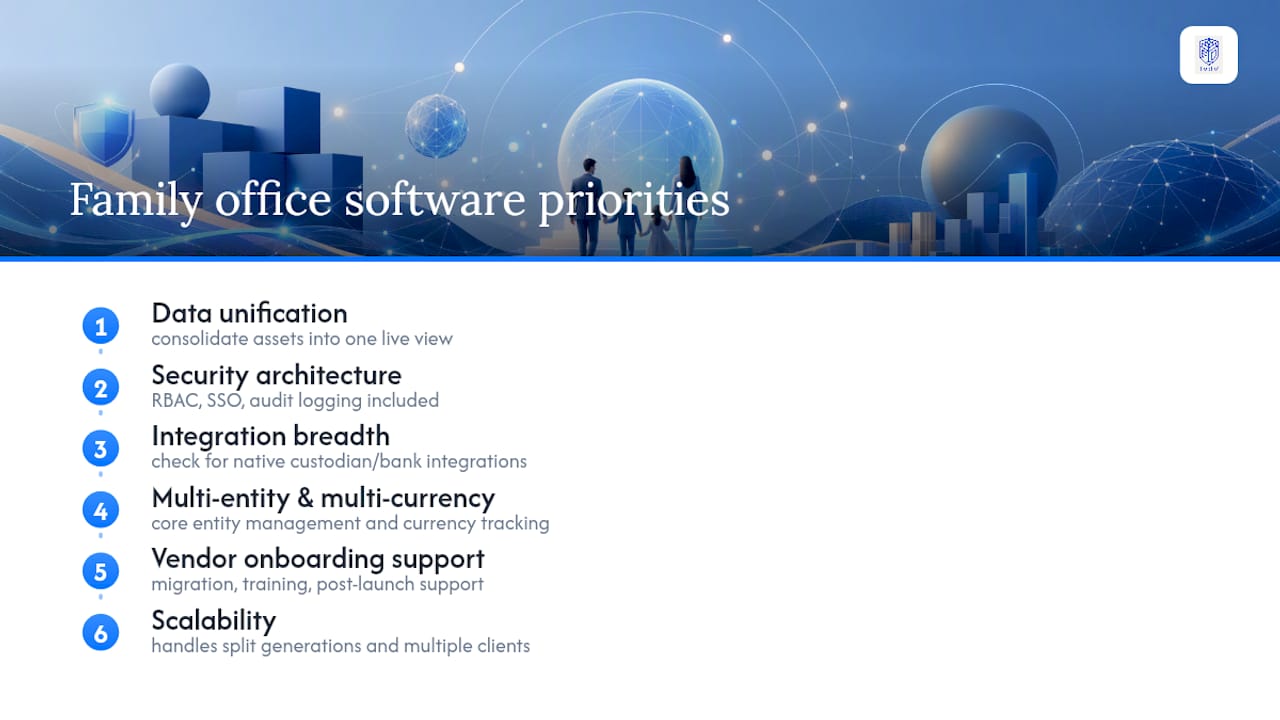
Prioritize these criteria in order:
Data unification. The platform should consolidate direct equity, LP commitments, real assets, and liquid holdings into one continuously updated view, rather than requiring separate tools stitched together with spreadsheets.
Security architecture. Confirm role-based access control, single sign-on support, and audit logging come standard, not as a paid add-on discovered after signing.
Integration breadth. Check whether your specific custodians and banks are already supported or will require custom API work, since that single detail can swing your timeline by weeks.
Multi-entity and multi-currency handling. Families managing wealth across borders need currency tracking and entity management as core functionality, not an afterthought bolted onto a domestic-first product.
Vendor onboarding support. Ask what migration assistance, training workshops, and post-launch support are actually included, versus billed separately as professional services.
Scalability. A platform built for a single family should still work if a second generation splits into separate branches or a family office starts serving multiple client families.
Suites like GCA-FopFo, which bundle family tree management, asset tracking, currency oversight, and benefits administration into one connected system, reduce the coordination overhead of running four disconnected vendor relationships side by side.
What Matters Most in the First Ninety Days?
The single biggest determinant of onboarding success is clean data paired with real stakeholder alignment, not the software itself. Every platform can handle the technical migration. Far fewer families agree in advance on who owns which decision. Get governance cadence written down before go-live, and the first ninety days run themselves.
How Full Option Family Office Speeds Up Every Onboarding Phase
Most of the friction in family office onboarding comes down to time spent stitching together tools that were never built to talk to each other. GCA-FopFo removes that friction by mapping its four applications directly onto the phases you just read: Familigi™ handles the family tree and genealogy structure that data mapping depends on, BoxAlong™ consolidates asset and holdings tracking into the single data layer your onboarding goal requires, Currencida™ handles multi-currency and crypto tracking without a separate spreadsheet, and SEBAA™ folds benefits, payroll, and investing into the same environment.
On the technical side, the suite supports bulk CSV import for faster data migration, role-based access control and single sign-on for governance from day one, and API and webhook connectivity for custodian and bank integrations. Onboarding services typically include migration assistance for legacy data, guided custodian connection setup, role-specific training workshops, and post-go-live support as part of the annual service subscription. If you are planning an implementation, visit the Full Option Family Office platform to request a migration checklist and see which application, or which combination, fits your family's structure best.
Frequently Asked Questions
How long does onboarding family office software typically take? A small single-family implementation usually goes live in four to six weeks. Multi-entity or multi-family setups with several custodians and complex permission structures often need eight to twenty weeks.
What data should be migrated first during onboarding? Prioritize the largest and most active holdings first: primary custodial accounts, direct equity positions, and any accounts with pending liquidity events. Lower-priority historical records can migrate in a second wave.
Who should be involved in a family office software implementation? At minimum, include the family principal, a designated family admin, the CIO or investment lead, external advisors with active mandates, and a technical contact from IT or the vendor's onboarding team.
What is the biggest risk during family office software onboarding? Incomplete data inventory and unclear ownership of mapping decisions cause more delays than any technical integration problem. A detailed field-mapping log with named owners prevents both.
Does family office software require ongoing fees after purchase? Most platforms, including GCA-FopFo, pair a one-time license purchase with a mandatory annual service and maintenance subscription covering updates, support, and platform access.