

If you pay a nanny, housekeeper, or caregiver and you control what they do and how they do it, you have a household employee, not a contractor, and you owe payroll taxes once their wages cross specific IRS thresholds. That single distinction determines whether you need an Employer Identification Number, a withholding plan, and a Schedule H filing next April.
Here is what to handle first:
-
Get an EIN. You need one before you can report any household staff payroll to the IRS or your state.
-
Check the wage threshold. If you pay one household employee $3,000 or more in cash wages in 2026, you generally must withhold Social Security and Medicare taxes.
-
Set up a withholding and deposit plan. Decide now whether you will cover the employee’s share of FICA yourself or withhold it from wages.
Pro Tip: Missing a deposit deadline or misclassifying a nanny as a contractor can trigger back taxes, penalties, and interest that stack up fast. The IRS treats household employment tax noncompliance as a straightforward paper trail issue, which means it’s also straightforward to catch.
Key Takeaways
Correctly paying household staff requires classifying the worker, registering for an EIN, tracking the $3,000 FICA and $1,000 FUTA thresholds, and filing Schedule H and W-2 forms on time.
| Point | Details |
|---|---|
| Confirm employee status | Use the control test: if you direct the work and how it’s done, it’s employment, not contracting. |
| Get an EIN early | You need one before withholding, depositing, or filing any household payroll taxes. |
| Track the wage thresholds | $3,000 triggers FICA withholding; $1,000 per quarter triggers FUTA on the first $7,000 of wages. |
| File on time | Furnish W-2s by January 31 and file Schedule H with your Form 1040 by April 15. |
| Consider integrated tools | SEBAA™ within GCA-FopFo combines payroll, benefits, and reporting for households managing complex or multi-currency staff arrangements. |
Table of Contents
-
What Records Should You Keep, and What Mistakes Should You Avoid?
-
DIY, Software, or Full-Service: How Should You Manage Payroll?
-
What Does Household Staff Payroll Cost, and When Are Deadlines?
-
What Should You Ask Before Choosing a Payroll Provider or Software?
Who Counts as a Household Employee?
The test is control, not job title. If you decide what work gets done and how it gets done, the person working in your home is your employee under federal law, regardless of whether you call them a nanny, a housekeeper, or a personal assistant.
Common household employees include:
-
Nannies and babysitters who work a regular schedule in your home
-
Housekeepers and cooks you direct on a recurring basis
-
Caregivers for aging parents or family members with disabilities
-
Private drivers, groundskeepers, and personal assistants
Contrast that with a plumber you call for a one-time repair or a lawn service that sends a rotating crew with their own equipment. Those workers control their own methods and often serve multiple clients, which typically makes them independent contractors, not your employees.
The dollar trigger matters as much as the job description. If you pay a single household employee cash wages of $3,000 or more in 2026, you generally must withhold and pay Social Security and Medicare taxes on that worker’s wages. Separately, a $1,000 test in any calendar quarter triggers FUTA obligations, which run on a different wage base entirely.
Pro Tip: Watch for these misclassification signals: you set the hours, you supply the cleaning products or the car seat, and the relationship has lasted months rather than a single job. Any one of those points toward employee status, and all three together make it nearly certain.
What Taxes Do Household Employers Pay?
Four separate taxes can apply to household staff payroll, and each one has its own rule for when it kicks in. Social Security and Medicare, together called FICA, are the ones most families encounter first.
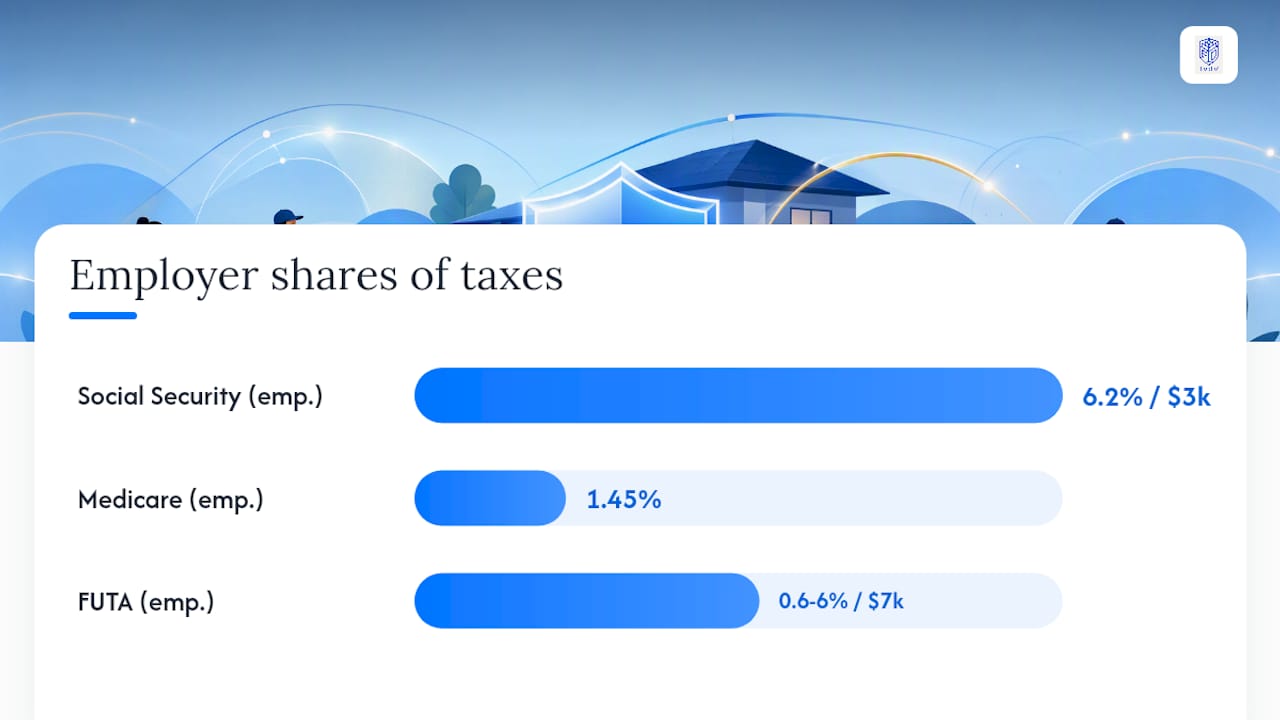
The employer and employee each owe 7.65% of wages, split between 6.2% for Social Security and 1.45% for Medicare, for a combined 15.3% once you add both shares together. You can choose to pay the employee’s half yourself as an added benefit, but the IRS still requires the full 15.3% to be accounted for.
Federal unemployment tax, or FUTA, is entirely on you as the employer. If you paid $1,000 or more in cash wages in any calendar quarter, FUTA applies to the first $7,000 of wages per employee, though you may qualify for a credit against state unemployment contributions you have already paid.
Federal income tax withholding is different from the other two: it is optional. You are not required to withhold it unless your employee asks for it and completes a Form W-4. State unemployment insurance rules vary by state, so check your state labor agency before assuming FUTA is your only unemployment obligation.
| Tax | Who Pays | Rate or Threshold |
|---|---|---|
| Social Security | Employer and employee | 6.2% each on wages once the $3,000 threshold is met |
| Medicare | Employer and employee | 1.45% each, plus Additional Medicare Tax on higher wages |
| FUTA | Employer only | 0.6% to 6% effective rate on first $7,000 of wages, triggered at $1,000/quarter |
| Federal income tax | Employer withholds if requested | Voluntary, based on employee’s W-4 |
Deposit timing depends on your total tax liability. Some families deposit monthly, others semiweekly, and the IRS assigns your schedule based on the amounts you report.
How Do You Set Up Household Payroll Step by Step?
Getting household employee payroll running correctly takes a specific sequence. Skip a step and you risk withholding the wrong amount or missing a filing deadline months later.
-
Apply for an EIN through the IRS, even if you already have a personal Social Security number.
-
Verify work authorization by completing Form I-9 for every new hire within three business days of their start date.
-
Confirm employee classification using the control test, and document your reasoning in case you’re ever asked.
-
Collect Form W-4 if the employee wants federal income tax withheld; otherwise, note that withholding is voluntary.
-
Register with your state labor and tax agencies for state unemployment insurance and new-hire reporting.
-
Choose a deposit method, whether that’s the IRS’s Electronic Federal Tax Payment System or a payroll service that handles deposits for you.
-
Set a pay schedule and start issuing paystubs that show gross wages, withholdings, and net pay.
-
Prepare year-end forms: a Form W-2 for your employee and Schedule H attached to your own Form 1040.
Store these documents for every household employee: signed W-4, completed I-9, Social Security card verification, and a written payroll authorization if you’re paying through a bank transfer or service.
A simple annual calendar helps keep this on track:
| Timing | Action |
|---|---|
| At hire | Complete I-9, collect W-4 if requested, register with state |
| Each pay period | Withhold FICA (and income tax if elected), issue paystub |
| Quarterly | Confirm FUTA liability, make estimated payments if needed |
| By January 31 | Furnish W-2 to employee |
| By April 15 | File Schedule H with your Form 1040 |
Once you must withhold FICA or federal income tax, you’re required to issue a W-2 and file Schedule H, and W-2 copies need to reach your employee by February 1 following the tax year.
What Records Should You Keep, and What Mistakes Should You Avoid?
Recordkeeping is your best defense if the IRS ever asks how you calculated household staff wages. Keep payroll registers, every signed W-4 and I-9, canceled checks or bank transfer confirmations, and a running log of hours worked, especially for hourly employees.

Retain these records for at least four years after the tax becomes due, since that’s the window in which the IRS can typically assess additional tax.
The mistakes that trip up families most often:
-
Misclassifying an employee as a contractor to avoid payroll taxes, which the IRS can reclassify retroactively with penalties attached.
-
Missing quarterly deposit deadlines, which triggers failure-to-deposit penalties that grow the longer the balance sits unpaid.
-
Forgetting to issue a W-2 even though FICA was withheld all year, leaving your employee unable to file their own return correctly.
-
Assuming a part-time worker is automatically exempt, when in practice a part-time nanny working a few days a week can easily cross the annual wage threshold.
If you discover you skipped payroll setup for a prior year, gather whatever pay records exist, whether that’s bank statements, a check register, or informal notes on hours worked. Reconstructing a full year of household employee wages after the fact is possible but tedious, and it’s the point where consulting a tax professional or CPA who specializes in domestic employment saves real time.
DIY, Software, or Full-Service: How Should You Manage Payroll?
The right approach depends less on how much you want to spend and more on how complex your household staff situation actually is. A single part-time babysitter is a different calculation than a live-in caregiver plus a housekeeper across two properties in different states.
Doing it yourself costs the least in dollars but the most in time. You calculate withholding, track deposit deadlines, and file Schedule H manually. This works reasonably well for one employee with stable hours, but the margin for error climbs fast with multiple workers or irregular pay.

Payroll software for household employees automates the math and often handles deposits and W-2 generation for a monthly fee. It removes calculation errors but still leaves you responsible for the underlying compliance decisions, like classification and threshold tracking.
Full-service payroll providers take on tax filings, deposits, and year-end forms entirely. The tradeoff is cost and the fact that, even when a provider handles the mechanics, you remain the employer of record and ultimately liable if something is filed incorrectly.
A quick decision checklist:
-
One employee, simple schedule, comfortable with paperwork: DIY is workable.
-
Multiple employees or irregular pay: payroll software for household employees earns its fee quickly.
-
Multi-state households, live-in staff, or benefits beyond wages: a full-service provider or integrated platform reduces risk substantially.
| Option | Effort | Cost | Best For |
|---|---|---|---|
| DIY | High | Lowest | One employee, stable hours |
| Payroll software | Moderate | Mid-range | Multiple employees, standard needs |
| Full-service provider | Low | Highest | Complex, multi-state, or benefit-heavy households |
Pro Tip: If your household staff situation involves more than payroll, such as benefits, multiple currencies for staff working across borders, or coordination with a broader family office, an integrated platform that handles payroll alongside benefits and savings, like the SEBAA™ module inside GCA-FopFo, tends to save more time than a standalone payroll tool ever will.
What Does Household Staff Payroll Cost, and When Are Deadlines?
Budgeting for household employee wages means budgeting for the employer’s share of taxes on top of gross pay. Between the employer’s 7.65% FICA share and a FUTA rate that typically lands well under $7,000 worth of wages per employee, most families should plan for total employer tax costs in the high single digits as a percentage of wages, before adding any service fees.
Service costs vary by path. Payroll software subscriptions typically run a flat monthly fee. Full-service providers usually charge a monthly base fee plus a per-employee add-on, particularly for households managing more than one worker or multi-state compliance.
Deposit and filing deadlines follow a predictable rhythm:
-
Deposits: monthly or semiweekly, depending on your assigned schedule based on total tax liability.
-
Quarterly: confirm FUTA liability and any estimated tax payments.
-
January 31: furnish W-2 forms to each household employee.
-
April 15: file Schedule H with your personal Form 1040.
| Deadline | Filing or Action |
|---|---|
| Ongoing | Deposit FICA and FUTA per your assigned schedule |
| Quarterly | Review FUTA wage base and state unemployment payments |
| January 31 | Deliver W-2 to each household employee |
| April 15 | File Schedule H with Form 1040 |
How Do You Handle Minors, Family Members, or Live-In Staff?
Special cases come up more often than families expect, and each one has a slightly different tax treatment.
-
Do you pay FUTA on your minor child’s wages? No. Wages paid to your child under 21 are exempt from FUTA, though FICA rules can still differ depending on the child’s age and the nature of the work.
-
What about a spouse you employ? Wages paid to a spouse are generally exempt from FICA and FUTA.
-
Do parent caregivers count? Wages paid to your parent are typically exempt from FUTA, and FICA exemptions can apply depending on your household circumstances.
-
How does a live-in employee change things? Live-in status doesn’t exempt someone from employee classification, but it can affect how you calculate wages if you provide lodging as part of compensation.
-
What if my household worker also has other clients? That alone doesn’t make them a contractor. The control test still governs: if you direct how the work gets done during the hours they’re with you, they’re your employee for that time.
Because these exceptions carry specific documentation requirements and can vary if any household member has income or residency ties outside the country, this is general information rather than tax advice, and cross-border or unusual family situations are worth a conversation with a qualified tax professional.
What Should You Ask Before Choosing a Payroll Provider or Software?
Before you commit to a payroll software for household employees or a full-service provider, get clear answers to a short list of questions.
Ask directly:
-
Who actually files the tax forms, and whose name goes on them?
-
Am I still legally liable if a filing is late or incorrect?
-
How is my employee’s Social Security number and banking data secured?
-
Does the platform support multi-state filings if my staff works across state lines?
-
Can it coordinate with workers’ compensation insurance requirements?
Watch for these red flags before signing anything:
-
The provider won’t clearly explain who handles your EIN registration.
-
There’s no mention of year-end W-2 or Schedule H support.
-
Pricing is vague about per-employee add-ons until after you’ve signed up.
-
Data security practices aren’t disclosed when asked directly.
-
Contract terms lock you in for a year with no clear cancellation path.
Pricing models range from flat monthly software fees to full-service packages priced per employee. A contract that hides fees until your first invoice is a bigger risk than a slightly higher upfront price with full transparency.
Why Integrated Payroll Makes Sense for Complex Households
Household staff payroll rarely exists in isolation. Families managing a nanny’s wages are often also managing a housekeeper’s schedule, a caregiver’s benefits, and sometimes staff who work across more than one property or currency. Treating payroll as a standalone task, separate from the rest of a family’s financial administration, is where a lot of the friction in this article actually comes from.
The families who handle this most smoothly tend to be the ones who stop juggling separate logins, separate spreadsheets, and separate vendor relationships for payroll, benefits, and asset tracking. Consolidating those records in one place doesn’t just save time. It reduces the chance that a W-4 gets misplaced or a deposit deadline slips through the cracks between two disconnected systems.
For households with staff paid in more than one currency, or families coordinating payroll alongside broader wealth management, an integrated approach handles the connective tissue that standalone payroll tools were never built to manage.
How SEBAA™ Simplifies Household Staff Payroll
Running household staff payroll inside a broader family office platform means your nanny’s W-2, your housekeeper’s withholding, and your family’s other financial holdings live in one secure place instead of three disconnected systems.

SEBAA™, part of the GCA-FopFo platform, is built specifically for the compliance and coordination challenges this article has walked through:
-
Payroll tax calculation for FICA and FUTA; state-specific tax rules are supported for a growing list of US states.
-
Pay-period record-keeping, withholding calculations, and export of the wages an tax totals needed to complete W-2 and Schedule H (the filings themselves are prepared by your payroll provider or CPA)
-
Benefits integration alongside payroll, not as a separate add-on
-
Secure handling of sensitive employee data like Social Security numbers and bank details
For families juggling multiple household employees, multi-currency staff payments, or broader family office needs, SEBAA™ is one strong option for bringing payroll into the same platform as your family’s other financial holdings. If your household staff payroll setup feels scattered across spreadsheets and separate services, explore the GCA-FopFo platform and see how SEBAA™ fits into your family’s full financial picture.
Where to Learn More About Household Employer Tax Rules
Every threshold and rate in this article traces back to a small set of primary sources worth bookmarking directly.
-
Publication 926, Household Employer’s Tax Guide lays out the full definition of a household employee, current wage thresholds, and FUTA rules in one document.
-
IRS Topic No. 756 breaks down FICA rates and Additional Medicare Tax withholding in plain terms.
-
The 2025 Instructions for Schedule H walk through exactly how to complete your annual filing, including prior-year threshold examples that show how these numbers shift.
Q: How much should I set aside for household staff payroll taxes? Plan on roughly 7.65% of wages for your employer FICA share, plus FUTA on the first $7,000 per employee, before any service fees.
Q: Do I need to withhold federal income tax from my nanny’s pay? Only if your employee requests it and completes a Form W-4. Otherwise, it’s optional.
Q: What happens if I paid a household employee under the table for years? Gather whatever records exist and consult a tax professional. The IRS’s four-year assessment window means older years may still need correction, but a documented approach going forward matters most.
Q: Can I outsource payroll and no longer worry about compliance? No. The IRS is clear that employers remain responsible for accurate filings even when a third party handles the paperwork.
This article is general information, not a substitute for advice from a qualified financial advisor. Consult a qualified financial professional about your own circumstances before acting on anything here.
Sources
-
Publication 926 (2026), Household Employer’s Tax Guide | Internal Revenue Service https://www.irs.gov/pub/irs-pdf/p926.pdf
-
Topic 756 (2026), Circular E, Employer's Tax Guide | Internal Revenue Service https://www.irs.gov/pub/irs-prior/p15--2026.pdf
-
fmx.cpa.texas.gov